Built for Oncology. Adapts to Your Workflow - Never the Other Way Around

Pattern of evenly spaced black dots on a white background, forming a halftone effect.
Personalized Clinical Notes
Blue arrow pointing diagonally upward to the left.
Custom templates for medical, surgical, and radiation oncology.
Blue arrow pointing diagonally upward to the left.
Long HPIs with past medical histories, event summaries
Blue arrow pointing diagonally upward to the left.
Comprehensive capture of medical management discussions on treatment, side effect management in Assessments
Blue arrow pointing diagonally upward to the left.
Disease-specific templates such as for breast cancer, lung cancer, hematological conditions etc.
Blue arrow pointing diagonally upward to the left.
Captures Advance Care Directives and Palliative Care discussions
Marvix AI oncology templates auto-capture patient history, medical events, and detailed treatment discussions.
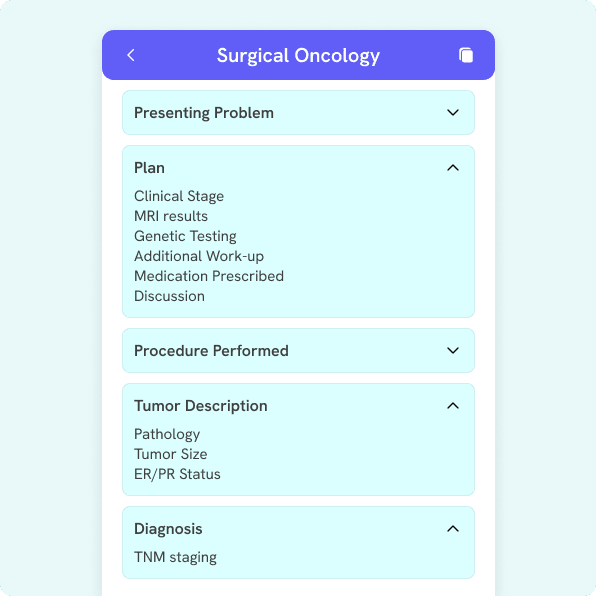
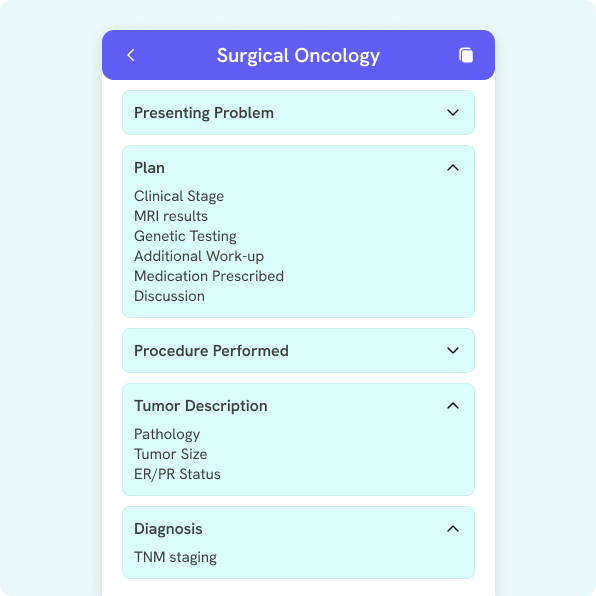
Mobile interface of a Surgical Oncology app showing sections for Presenting Problem, Plan with details, Procedure Performed, Tumor Description with details, and Diagnosis.
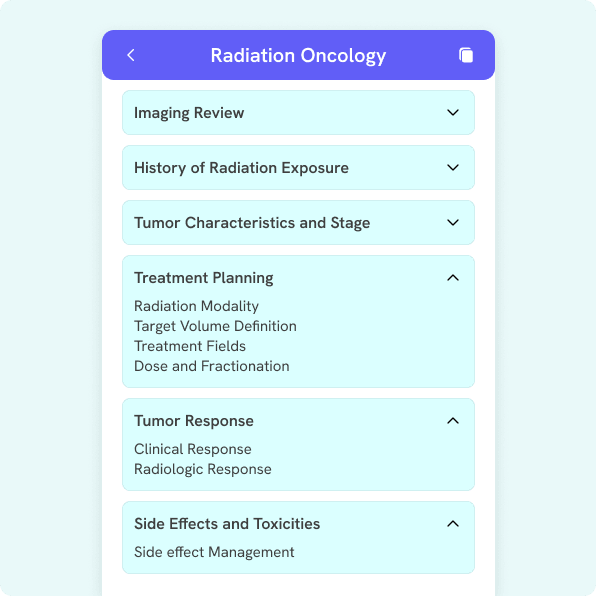
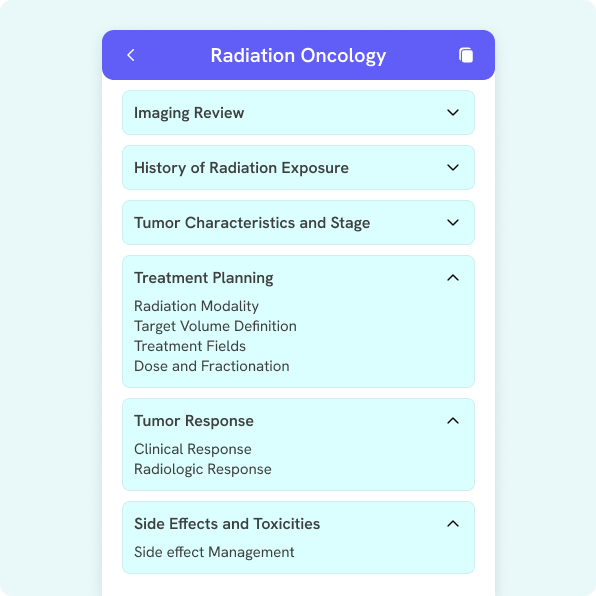
Mobile interface screen titled Radiation Oncology with expandable sections for Imaging Review, History of Radiation Exposure, Tumor Characteristics and Stage, Treatment Planning expanded to show Radiation Modality, Target Volume Definition, Treatment Fields, Dose and Fractionation, Tumor Response expanded to show Clinical Response and Radiologic Response, and Side Effects and Toxicities expanded to show Side effect Management.
Left-facing arrow icon inside a blue circular button.
Blue circular button with a right-pointing arrow icon.
Pattern of evenly spaced black dots on a white background, forming a halftone effect.
Seamless EHR Integration
Blue arrow pointing diagonally upward to the left.
Deep 2-way integration with oncology specific EHRs
Blue arrow pointing diagonally upward to the left.
Auto-syncs and pulls appointments
Blue arrow pointing diagonally upward to the left.
Pushes notes within individual sections of your templates (e.g., Diagnoses, Treatment plan, Assessments, Physical Exam)

Pattern of evenly spaced black dots on a white background, forming a halftone effect.
Captures Oncology Terminology with > 99% Accuracy
Blue arrow pointing diagonally upward to the left.
Trained on oncology-specific terminology, such as medication regimens and therapies, personalized diagnostic tests, procedures and diagnoses
Marvix AI trained on oncology terms with >99% accuracy for drugs, regimens, biomarkers, and diagnoses.
Pattern of evenly spaced black dots on a white background, forming a halftone effect.
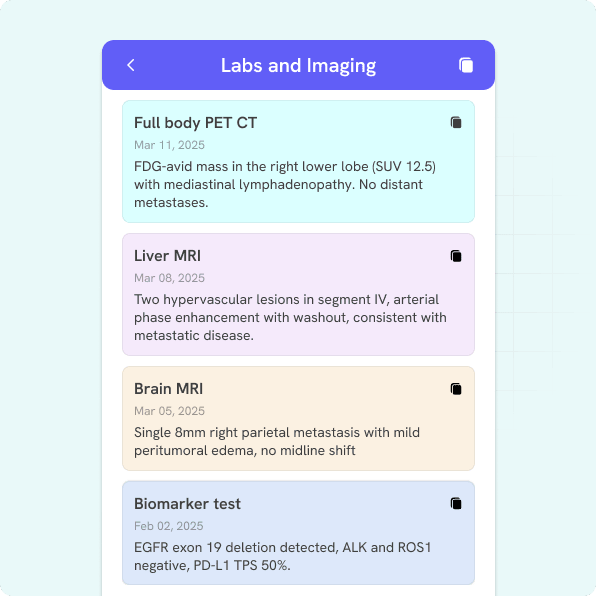
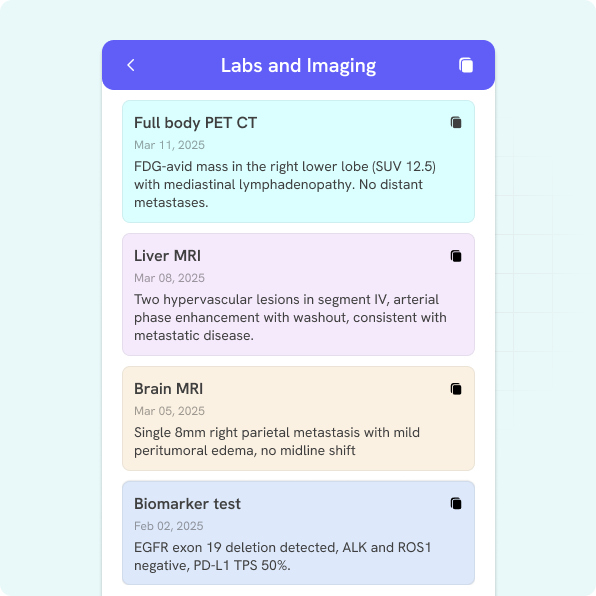
Marvix AI captures PET scans, MRIs, biomarker tests, and generates structured oncology imaging summaries.
Technical Inferencing by AI
Blue arrow pointing diagonally upward to the left.
Automatically records TNM staging
Blue arrow pointing diagonally upward to the left.
Creates technical summaries of lab/imaging data in non layman terms
Blue arrow pointing diagonally upward to the left.
Captures Karonfsky scores, ECOG scores
Pattern of evenly spaced black dots on a white background, forming a halftone effect.
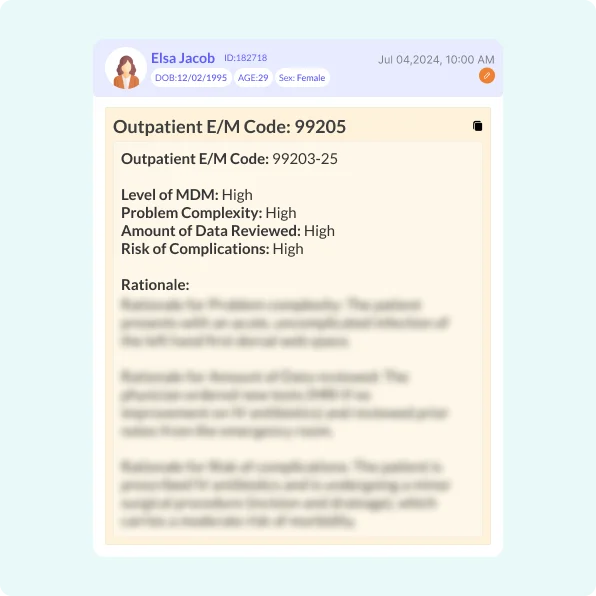
Automated Coding with Rationale as per Latest Guidelines
Blue arrow pointing diagonally upward to the left.
Auto-generates ICD-10, E/M codes, and add-on modifiers for accurate billing.
Blue arrow pointing diagonally upward to the left.
Compliance with oncology-specific reimbursement guidelines.
Blue arrow pointing diagonally upward to the left.
Add-on codes and modifiers for complexity & billing for extended time.
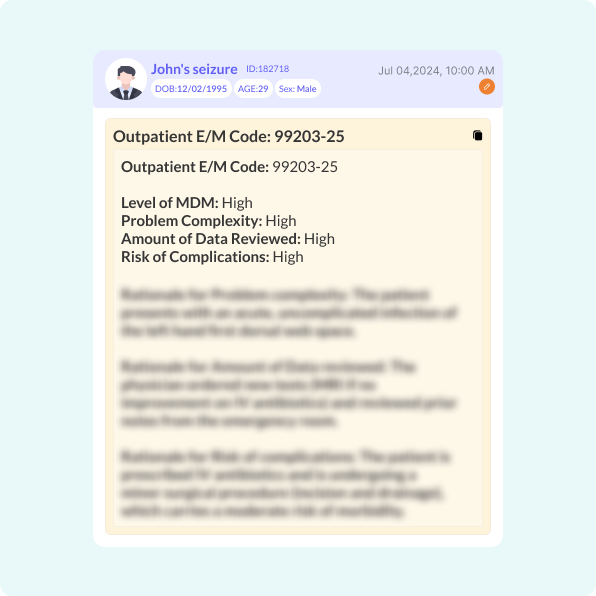
Marvix AI auto-generates ICD-10-CM, E/M,HCC & RAF scores with MDM rationale, add-ons, and compliance billing.
Pattern of evenly spaced black dots on a white background, forming a halftone effect.
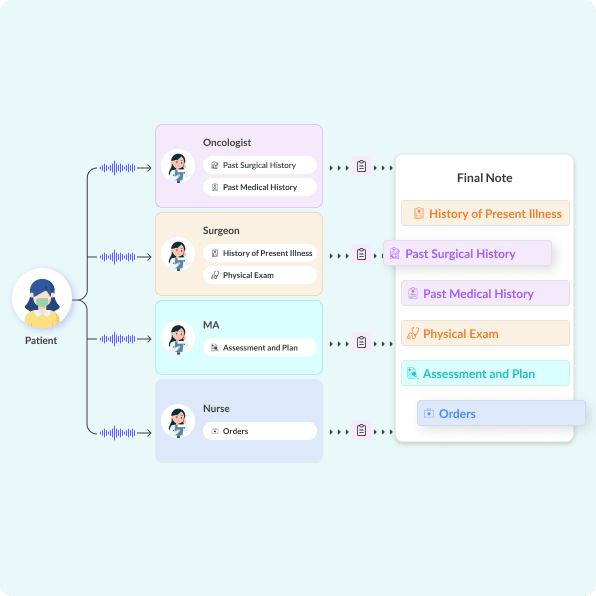
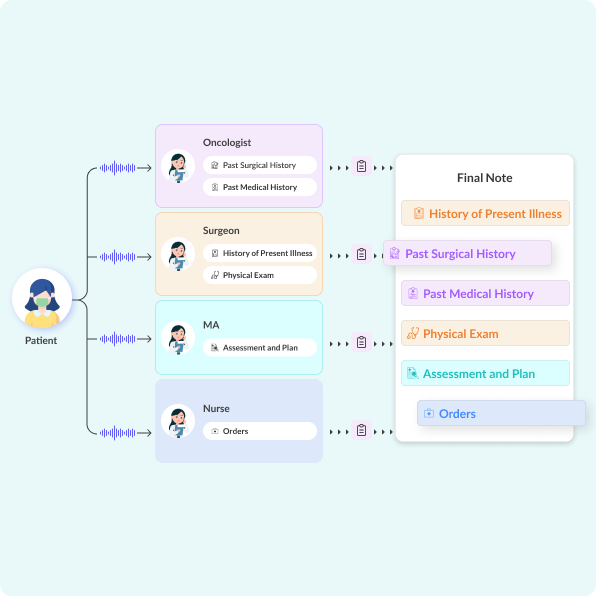
Marvix AI enables teamwork with oncologists, surgeons, nurses etc. through shared workflow notes.
Supports Multi-user Workflows
Blue arrow pointing diagonally upward to the left.
Collaborate with oncologists, surgeons, MAs and nurses on the same encounters to create comprehensive notes
Blue arrow pointing diagonally upward to the left.
Summarizes CCD documents across providers and inserts into HPI
Pattern of evenly spaced black dots on a white background, forming a halftone effect.
Composite Notes for Established Patients
Blue arrow pointing diagonally upward to the left.
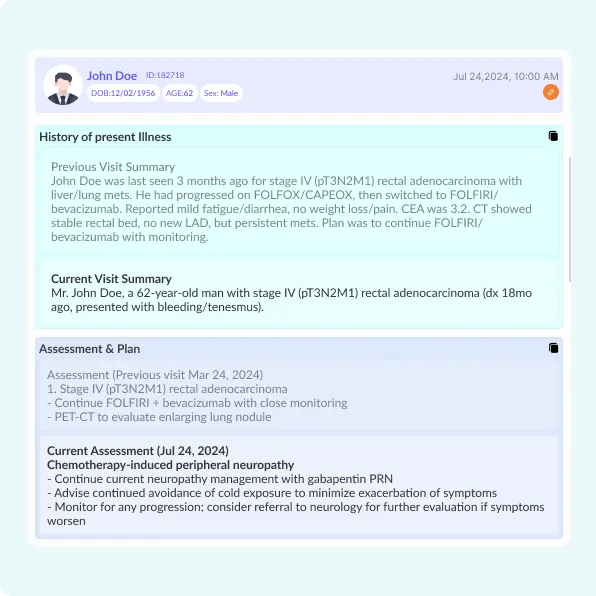
Carries forward HPIs, Assessment/Plans from historical notes of returning patients.
Blue arrow pointing diagonally upward to the left.
Creates summaries of past treatment regimens and embeds them in current notes
Marvix AI carries forward oncology histories, regimens, and assessments into composite notes for efficiency.
Pattern of evenly spaced black dots on a white background, forming a halftone effect.
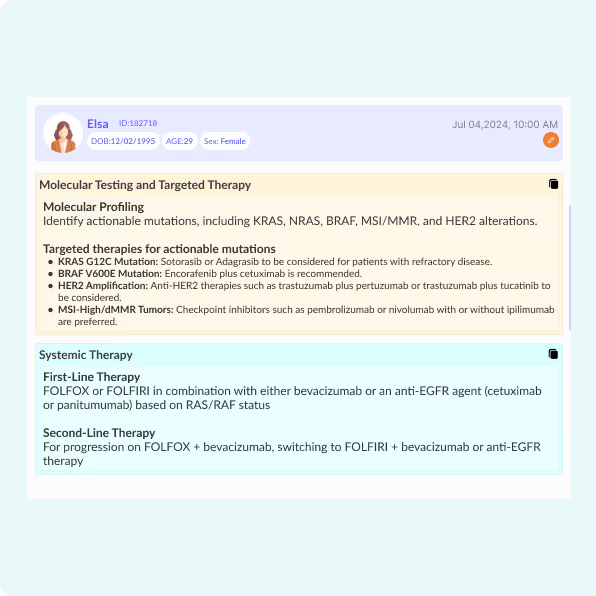
Marvix AI generates oncology recommendations with NCCN-based treatment protocols and diagnostic guidance.
Generates Recommendations Based on NCCN Guidelines
Blue arrow pointing diagonally upward to the left.
Recommends latest treatment protocols, diagnostic work-up advice as per NCCN guidelines

Built for Oncology. Adapts to Your Workflow - Never the Other Way Around

Pattern of evenly spaced black dots on a white background, forming a halftone effect.
Personalized Clinical Notes
Blue arrow pointing diagonally upward to the left.
Custom templates for medical, surgical, and radiation oncology.
Blue arrow pointing diagonally upward to the left.
Long HPIs with past medical histories, event summaries
Blue arrow pointing diagonally upward to the left.
Comprehensive capture of medical management discussions on treatment, side effect management in Assessments
Blue arrow pointing diagonally upward to the left.
Disease-specific templates such as for breast cancer, lung cancer, hematological conditions etc.
Blue arrow pointing diagonally upward to the left.
Captures Advance Care Directives and Palliative Care discussions
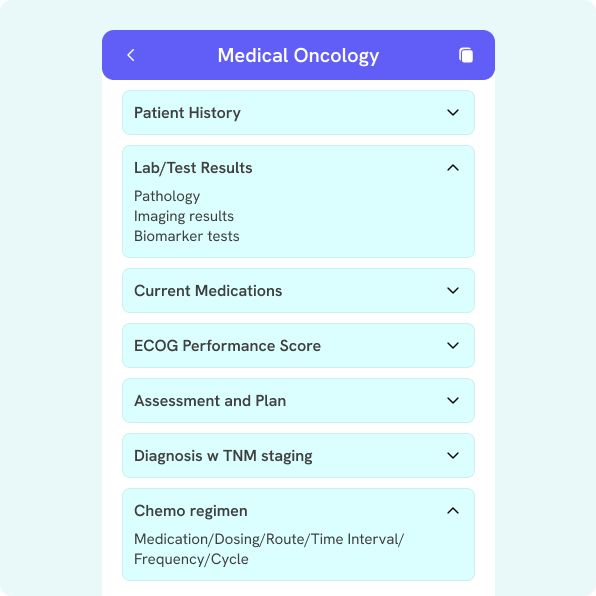
Medical oncology app interface displaying expandable sections including Patient History, Lab/Test Results with pathology and biomarker tests, Current Medications, ECOG Performance Score, Assessment and Plan, Diagnosis with TNM staging, and Chemo regimen details.
Mobile interface displaying a Surgical Oncology form with sections: Presenting Problem, Plan with details like Clinical Stage and MRI results, Procedure Performed, Tumor Description including Pathology and Tumor Size, and Diagnosis with TNM staging.
Radiation Oncology menu screen displaying sections: Imaging Review, History of Radiation Exposure, Tumor Characteristics and Stage, Treatment Planning with details on radiation modality, target volume definition, treatment fields, dose and fractionation; Tumor Response with clinical and radiologic response; and Side Effects and Toxicities with side effect management.
Left-facing arrow icon inside a blue circular button.
Blue circular button with a right-pointing arrow icon.
Pattern of evenly spaced black dots on a white background, forming a halftone effect.
Seamless EHR Integration
Blue arrow pointing diagonally upward to the left.
Deep 2-way integration with oncology specific EHRs
Blue arrow pointing diagonally upward to the left.
Auto-syncs and pulls appointments
Blue arrow pointing diagonally upward to the left.
Pushes notes within individual sections of your templates(e.g., Diagnoses, Treatment plan, Assessments, Physical Exam)
Pattern of evenly spaced black dots on a white background, forming a halftone effect.
Captures Oncology Terminology with > 99% Accuracy
Blue arrow pointing diagonally upward to the left.
Trained on oncology-specific terminology, such as medication regimens and therapies, personalized diagnostic tests, procedures and diagnoses
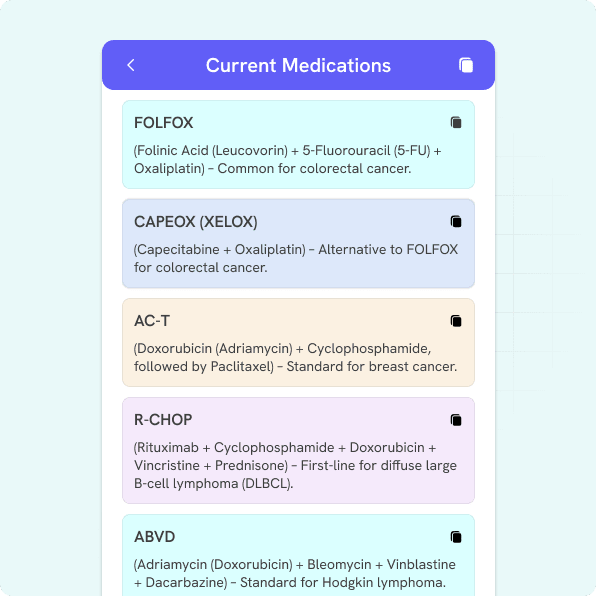
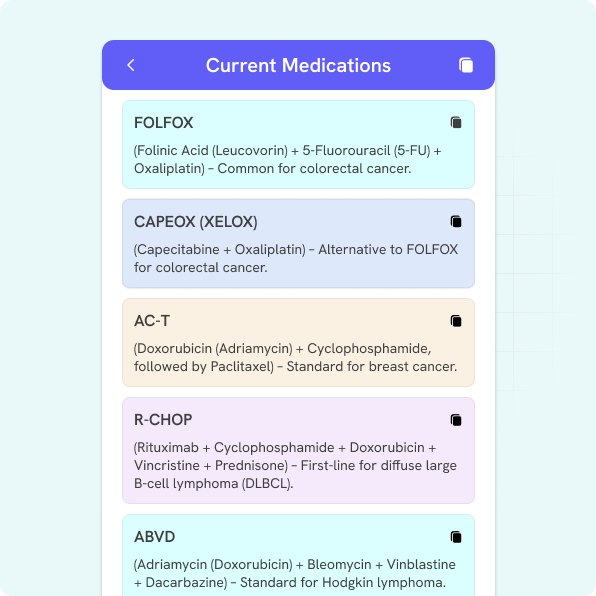
Mobile screen showing a list of current medications: FOLFOX for colorectal cancer, CAPEOX (XELOX) alternative to FOLFOX, AC-T standard for breast cancer, R-CHOP for diffuse large B-cell lymphoma, and ABVD standard for Hodgkin lymphoma.
Pattern of evenly spaced black dots on a white background, forming a halftone effect.
Technical Inferencing by AI
Blue arrow pointing diagonally upward to the left.
Automatically records TNM staging
Blue arrow pointing diagonally upward to the left.
Creates technical summaries of lab/imaging data in non layman terms
Blue arrow pointing diagonally upward to the left.
Captures Karonfsky scores, ECOG scores
Mobile screen showing Labs and Imaging results: Full body PET CT with FDG-avid mass in right lower lobe; Liver MRI with two hypervascular lesions in segment IV; Brain MRI showing 8mm right parietal metastasis; Biomarker test detecting EGFR exon 19 deletion and PD-L1 TPS 50%.
Pattern of evenly spaced black dots on a white background, forming a halftone effect.
Automated Coding with Rationale as per Latest Guidelines
Blue arrow pointing diagonally upward to the left.
Auto-generates ICD-10, E/M codes, and add-on modifiers for accurate billing.
Blue arrow pointing diagonally upward to the left.
Compliance with oncology-specific reimbursement guidelines.
Blue arrow pointing diagonally upward to the left.
Add-on codes and modifiers for complexity & billing for extended time.
Medical record summary for John, a 29-year-old male, detailing a high complexity outpatient E/M code 99203-25 with high levels of MDM, problem complexity, data reviewed, and risk of complications dated July 4, 2024, 10:00 AM.
Pattern of evenly spaced black dots on a white background, forming a halftone effect.
Supports Multi-user Workflows
Blue arrow pointing diagonally upward to the left.
Collaborate with oncologists, surgeons, MAs and nurses on the same encounters to create comprehensive notes
Blue arrow pointing diagonally upward to the left.
Summarizes CCD documents across providers and inserts into HPI
Diagram showing patient audio input feeding into oncologist, surgeon, medical assistant, and nurse categories each recording specific medical notes, which combine into a final note with sections for history of present illness, past surgical history, past medical history, physical exam, assessment and plan, and orders.
Pattern of evenly spaced black dots on a white background, forming a halftone effect.
Composite Notes for Established Patients
Blue arrow pointing diagonally upward to the left.
Carries forward HPIs, Assessment/Plans from historical notes of returning patients.
Blue arrow pointing diagonally upward to the left.
Creates summaries of past treatment regimens and embeds them in current notes
Medical summary for John Doe, a 62-year-old male with stage IV rectal adenocarcinoma, detailing previous and current visit summaries, assessment, and chemotherapy-induced peripheral neuropathy management plan.
Pattern of evenly spaced black dots on a white background, forming a halftone effect.
Generates Recommendations Based on NCCN Guidelines
Blue arrow pointing diagonally upward to the left.
Recommends latest treatment protocols, diagnostic work-up advice as per NCCN guidelines
Medical summary for patient Elsa, female, age 29, detailing molecular testing findings including KRAS, NRAS, BRAF mutations, and targeted therapies with recommendations for KRAS G12C and BRAF V600E mutations, HER2 amplification, and MSI-High/dMMR tumors. Includes systemic therapy guidelines for first-line and second-line treatments involving FOLFOX, FOLFIRI, bevacizumab, and anti-EGFR agents.
Before Visit
During  Visit
After Visit
Personalized Clinical Notes
Blue paper airplane icon pointing northeast.
Custom templates for medical, surgical, and radiation oncology.
Blue paper airplane icon pointing northeast.
Long HPIs with past medical histories, event summaries
Blue paper airplane icon pointing northeast.
Comprehensive capture of medical management discussions on treatment, side effect management in Assessments
Black and white halftone pattern forming a circular shape with a dotted texture.
Seamless EHR Integration
Blue paper airplane icon pointing northeast.
Deep 2-way integration with oncology specific EHRs
Blue paper airplane icon pointing northeast.
Auto-syncs and pulls appointments
Blue paper airplane icon pointing northeast.
Pushes notes within individual sections of your templates
Black and white halftone pattern forming a circular shape with a dotted texture.
Captures Oncology Terminology with > 99% Accuracy
Blue paper airplane icon pointing northeast.
Trained on oncology-specific terminology, such as medication regimens and therapies, personalized diagnostic tests, procedures and diagnoses
Black and white halftone pattern forming a circular shape with a dotted texture.
Technical Inferencing by AI
Blue paper airplane icon pointing northeast.
Automatically records TNM staging
Blue paper airplane icon pointing northeast.
Creates technical summaries of lab/imaging data in non layman terms
Blue paper airplane icon pointing northeast.
Captures Karonfsky scores, ECOG scores
Black and white halftone pattern forming a circular shape with a dotted texture.
Automatic Coding & Compliance
Blue paper airplane icon pointing northeast.
Auto-generates ICD-10, E/M codes, and add-on modifiers for accurate billing.Compliance with oncology-specific reimbursement guidelines.
Black and white halftone pattern forming a circular shape with a dotted texture.
Abstract blue geometric shape with rounded edges on a white background.

How Marvix AI Compares Against Other AI Scribes

Feature
Marvix
Competitors
Cancer-Specific, Visit-Specific, Sub-Specialty Specific Templates
(e.g., Breast, Lung, GI, Hematologic, Follow-up After Chemo, Post Op Report)
Blue square checkbox with a white check mark inside.Light gray outlined square checkbox with no checkmark inside.
Detailed Diagnosis Characterization
(Histopathology, Biomarker status, TNM staging, Metastatic sites)
Blue square checkbox with a white check mark inside.Light gray outlined square checkbox with no checkmark inside.
Comprehensive Patient Histories
(Including Prior Treatments, Symptoms, Chronic Conditions)
Blue square checkbox with a white check mark inside.Light gray outlined square checkbox with no checkmark inside.
Multi-User Workflows
(Collaborate with MAs, NPs, RN Navigators)
Blue square checkbox with a white check mark inside.Light gray outlined square checkbox with no checkmark inside.
Technical Summaries for Labs, Imaging and Pathology
(Collaborate with MAs, NPs, RN Navigators)
Blue square checkbox with a white check mark inside.Light gray outlined square checkbox with no checkmark inside.
Comprehensive Symptom-Wise Assessments and Plans
(Medication Regimen, Side Effect Management, Managing Comorbidities)
Blue square checkbox with a white check mark inside.Light gray outlined square checkbox with no checkmark inside.
Generates Supporting Documents
(After Visit Summaries, Prior Authorization Reports, Referral Letters)
Blue square checkbox with a white check mark inside.Light gray outlined square checkbox with no checkmark inside.
Creates Composite Notes for Returning Patients
(Embeds summaries of prior notes, labs, pt. intake forms in current notes)
Blue square checkbox with a white check mark inside.Light gray outlined square checkbox with no checkmark inside.
Patient Performance Status capture
(ECOG scores, Karnofsky Scores)
Blue square checkbox with a white check mark inside.Light gray outlined square checkbox with no checkmark inside.
Try Marvix Free for 30 Days—No Card Needed
Full feature access – Custom templates, smart note formats & EHR integration
Zero commitment – Only subscribe if it’s the perfect fit
Loved by clinicians – 90% of trial users choose to stay
Blue paper airplane icon on white background.Abstract blue geometric shape with rounded edges on a white background.

Blogs

FAQs

What type of devices are compatible with Marvix?
Can I get a free trial with Marvix?
Can Marvix assist with generating billing codes?
How does Marvix handle patient confidentiality and data security?

How do I customize my notes?
Do you offer practice discounts?
How will Marvix integrate with my existing EHR?
Can I edit my clinical notes after they're created by Marvix?
Can Marvix be used for tele-health visits?
How accurate is Marvix?
How does Marvix handle different accents or languages?
Does Marvix support multi-user workflows?
Can I migrate information from my prior clinical notes into my current notes generated by Marvix?
Circular black grid pattern with thin white lines forming squares on a transparent background.