


Documentation takes up a big part of every oncologist's working day in the clinic. Each patient brings a long history of diagnoses, treatments, scans and lab results. Much of that history comes from outside facilities such as faxes, PDFs and other formats. Most AI scribes only listen to the conversation, so the responsibility of reviewing the chart history stays with you.
The right AI scribe for iKnowMed pulls each patient's records directly from the EHR before the visit. It then listens to the consult and writes the clinical note. The finished note is pushed back into the EHR section by section.
Marvix AI is made for oncology and works inside iKnowMed through the clinic day. This guide covers how it handles each step, from the schedule to billing.
iKnowMed is Ontada's EHR, built for oncology and hematology practices. It includes treatment regimen libraries and chemotherapy order management for complex cancer care.
An AI scribe for iKnowMed listens to the consult and writes the clinical note for you. It pulls the schedule and patient records before the consult begins, and after the consult, it sends each part of the note into its matching section.
Marvix AI is an AI scribe made for oncology. It offers custom templates for each oncology subspecialty, along with disease-specific templates for cancers such as breast and lung cancer. It integrates 2-way with iKnowMed, pulling schedules and records in and pushing finished notes back. It summarizes prior records before each consult and captures TNM staging and ECOG scores in the note. It also generates billing codes with the reasoning behind each one.
Most AI scribes were designed for general outpatient care. Oncology consults depend on long treatment histories and records from many sources. This adds work and cognitive load which most tools leave to the doctor.
If you are evaluating an AI scribe for iKnowMed, these are the capabilities that matter.
Here's a brief overview of what makes Marvix AI one of the best AI scribes for iKnowMed.
In this blog, let's explore how Marvix AI works inside iKnowMed and why it fits oncology practices so well. To see what this looks like in practice, let's walk through a real clinic day.
Meet Dr. Joanne Fredericks, a hematologist-oncologist at a community oncology practice. She sees about 20 patients each day, and many of them are on active infusion treatment. Her patients have breast cancer, lymphoma, CLL and multiple myeloma, often with years of treatment behind them.
Before each follow-up, she needs the latest pathology, imaging and lab results in front of her. Many of those reports come from outside hospitals and imaging centers as faxes and PDFs.
Before Marvix AI can prepare anything, it needs to know which consults are on the schedule. Marvix AI pulls each doctor's appointments automatically from the EHR, so the day is ready without manual entry.
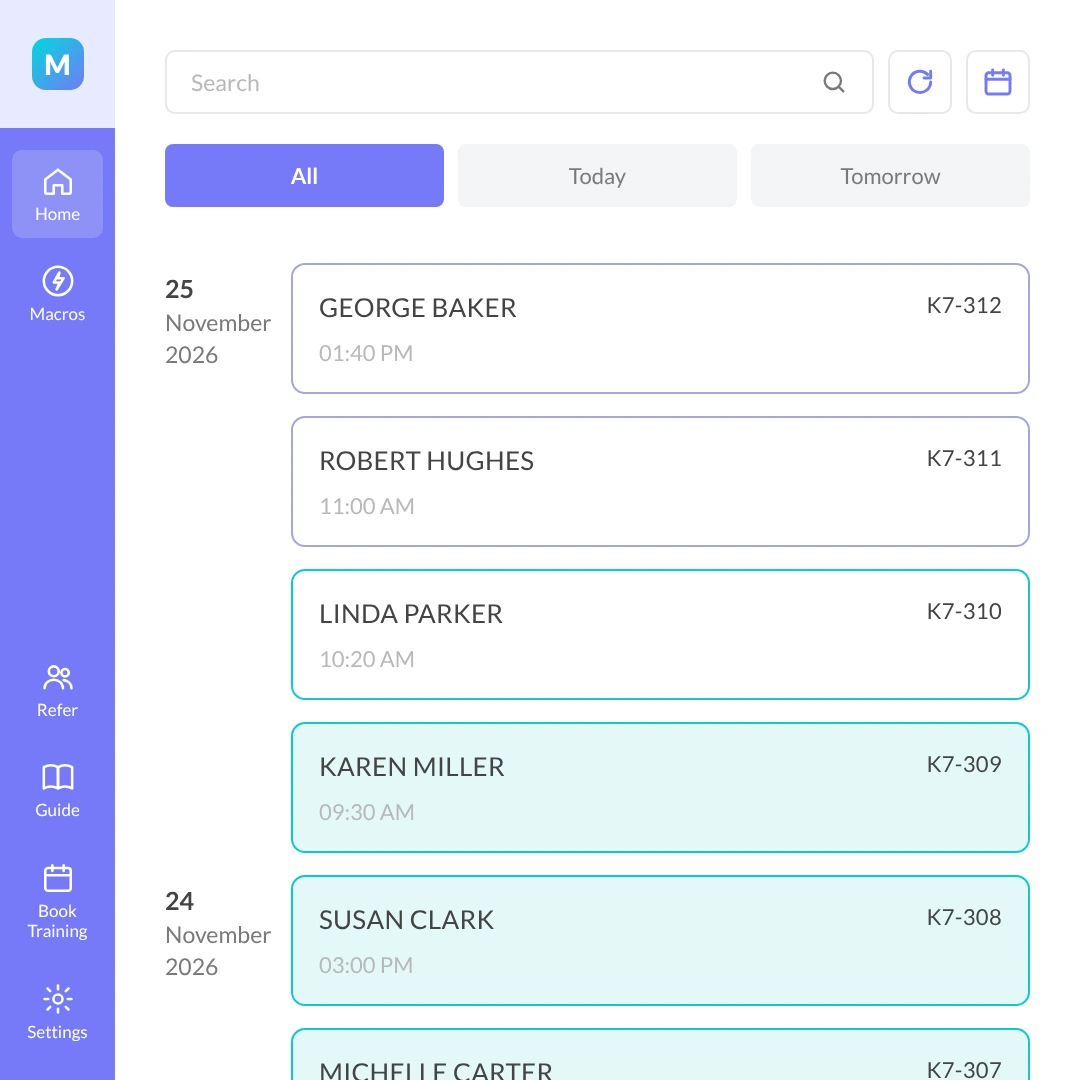
Marvix AI syncs each doctor's schedule automatically. The sync runs during the hours set for each doctor, in that doctor's own local time. A practice with oncologists across different time zones gets every schedule at the right time.
Marvix detects visit type automatically at the moment of pull. It identifies whether an appointment is a first visit or a follow-up.
Patient details include date of birth, age, gender, MRN, contact details and preferred language, which arrive with each appointment. Every clinical note starts with the right patient information already in place.
Dr. Fredericks's pull hours are set for early morning in her clinic's time zone. By the time she logs in, all 20 of her consults are already in Marvix AI. Each one shows the patient's age, MRN and preferred language, so nobody on her team retypes them.
A clinic schedule changes through the day as patients cancel or miss visits. Marvix AI keeps visits that are booked, arrived or fulfilled in the queue. Cancelled visits and no-shows are dropped automatically, so the queue matches the real day.
Marvix AI also recognizes whether each appointment is a first visit or a follow-up.
A patient cancels her breast cancer follow-up at 8 AM. The visit drops out of Dr. Fredericks's queue, so she doesn't prepare for a consult that won't happen. In the meantime, a new lymphoma referral books an appointment and it shows up as a first visit, in her schedule inside Marvix AI.
Before every consult, the doctor needs to know what has happened since the patient was last seen. Marvix AI brings this history over from iKnowMed before the visit, so nobody has to search for it. The doctor then starts the consult with the full picture in front of them.
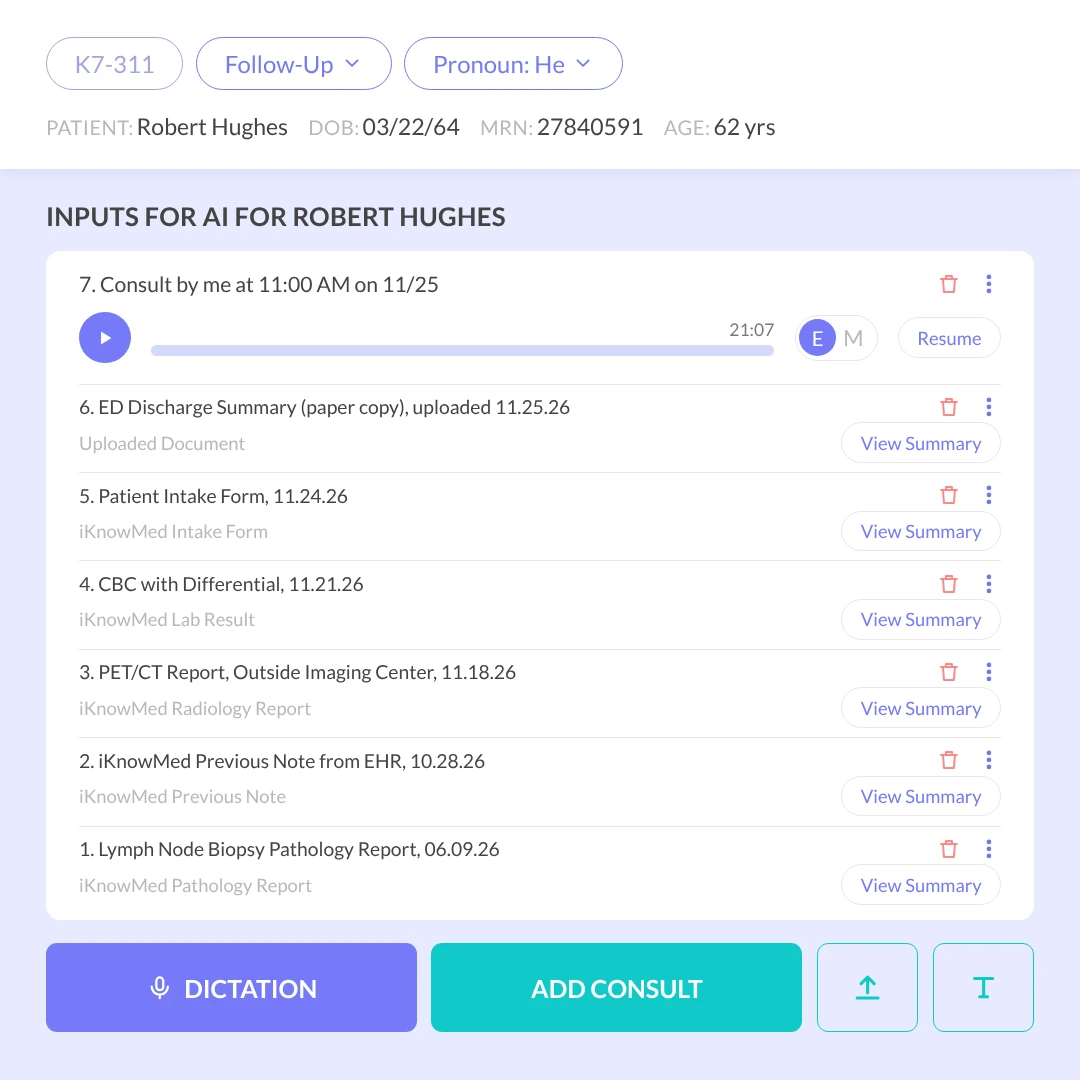
Each patient's prior notes are pulled directly from iKnowMed, at the same time as their appointments. Past assessments and treatment decisions are ready to read when the doctor opens the consult. Opening old encounters one by one is no longer part of preparing for a visit.
Her 10:20 AM patient has CLL and has been seen 14 times over four years. Marvix AI has already pulled every prior note from the EHR. Dr. Fredericks can see the last treatment decision without opening a single old encounter.
A large part of a patient's record can come from outside the clinic, such as hospital imaging and biopsy results. Marvix AI pulls these clinical documents directly from iKnowMed, so they are ready for review before the consult. These are the document types it brings in:
Her 11 AM patient has diffuse large B-cell lymphoma and had a PET scan at an outside imaging center. The PET report arrived as a faxed PDF and was filed in the chart. Marvix AI pulls it in with the patient's latest labs and the original pathology report.
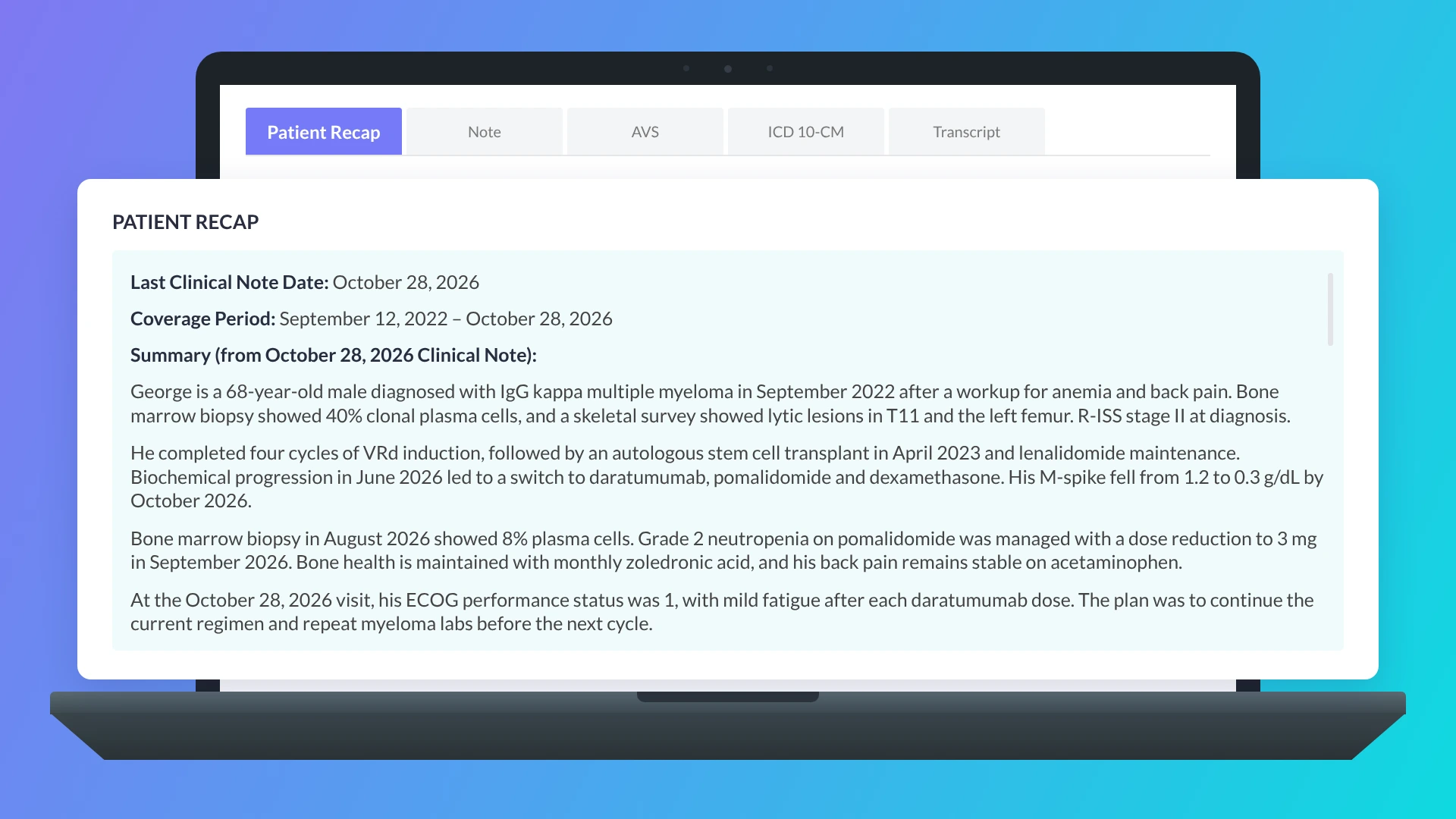
The Patient Recap is a structured, chronological summary of the patient's history. It pulls prior notes, labs, imaging and earlier clinical events from the EHR. It also includes documents uploaded during pre-charting, such as faxes and handwritten notes. Lab and imaging findings are summarized in the clinical terms an oncologist would use.
Summaries are fully customizable at the individual provider level. Each provider can configure:
These preferences are set up by the team, so the physician doesn’t need to do it manually. Once set up, these preferences apply automatically every time a summary is generated.
Her 1:40 PM patient has multiple myeloma and four years of treatment history. The Patient Recap lists each regimen change, the lab trends that drove it and the latest imaging in a chronological order, written in Dr Fredericks’s style. Due to this level of ease, she reviews the summary in two minutes before the patient walks into the room.
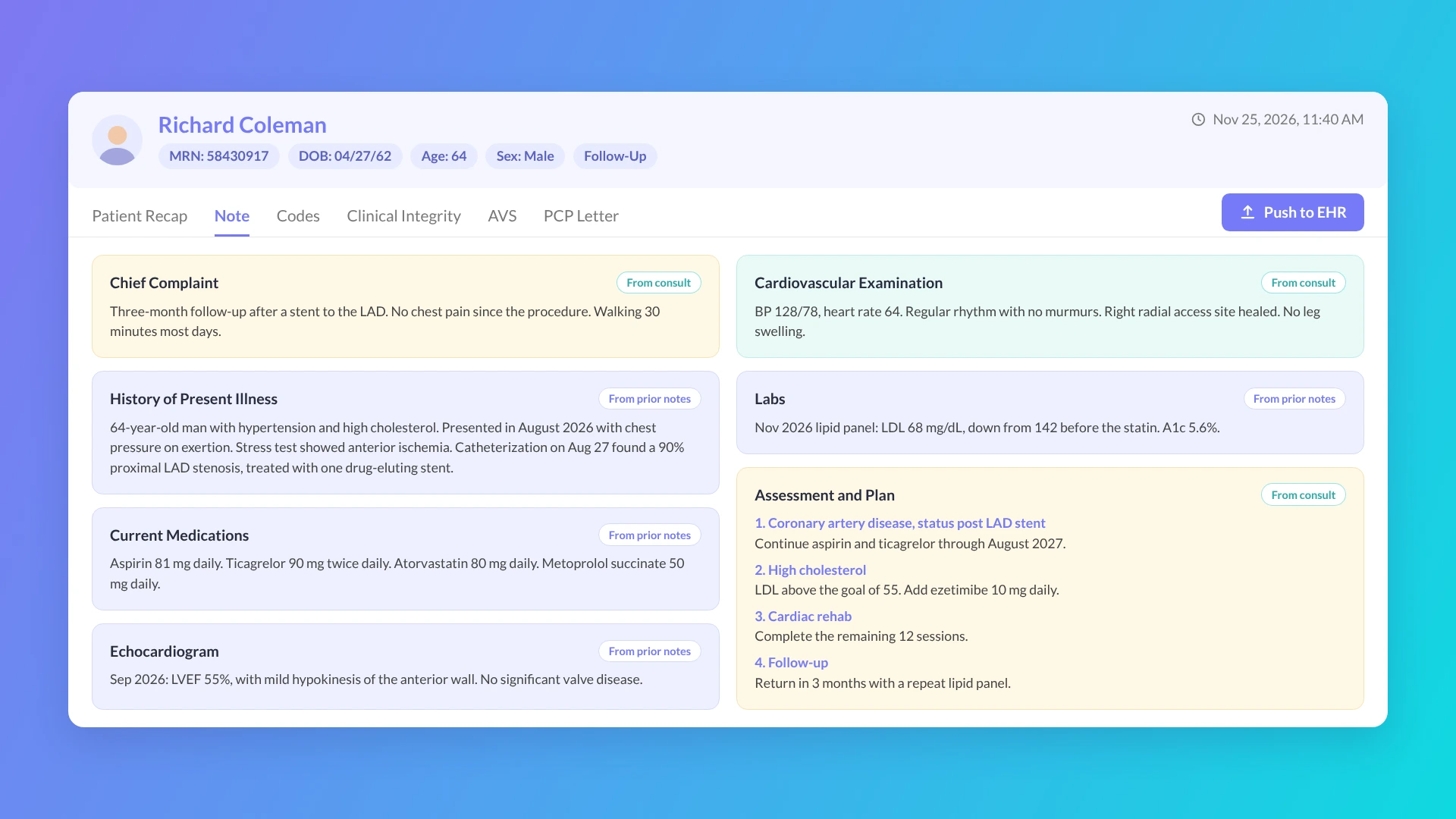
A follow-up note needs context from earlier visits to make sense on its own. The Composite Note adds relevant history from the patient’s chart history into the current consult's note. It can include a summary of past treatment regimens, so today's plan reads in context.
Her breast cancer patient is on her sixth cycle of AC-T. The Composite Note adds a short summary of the earlier cycles and any dose changes into today's note. Dr. Fredericks doesn't retype the treatment history at every visit.
A visit can be considered complete only if the note is pushed into the EHR into the right sections. Marvix AI pushes the signed note back into the mapped actions of the EHR, so nobody copies text between systems.
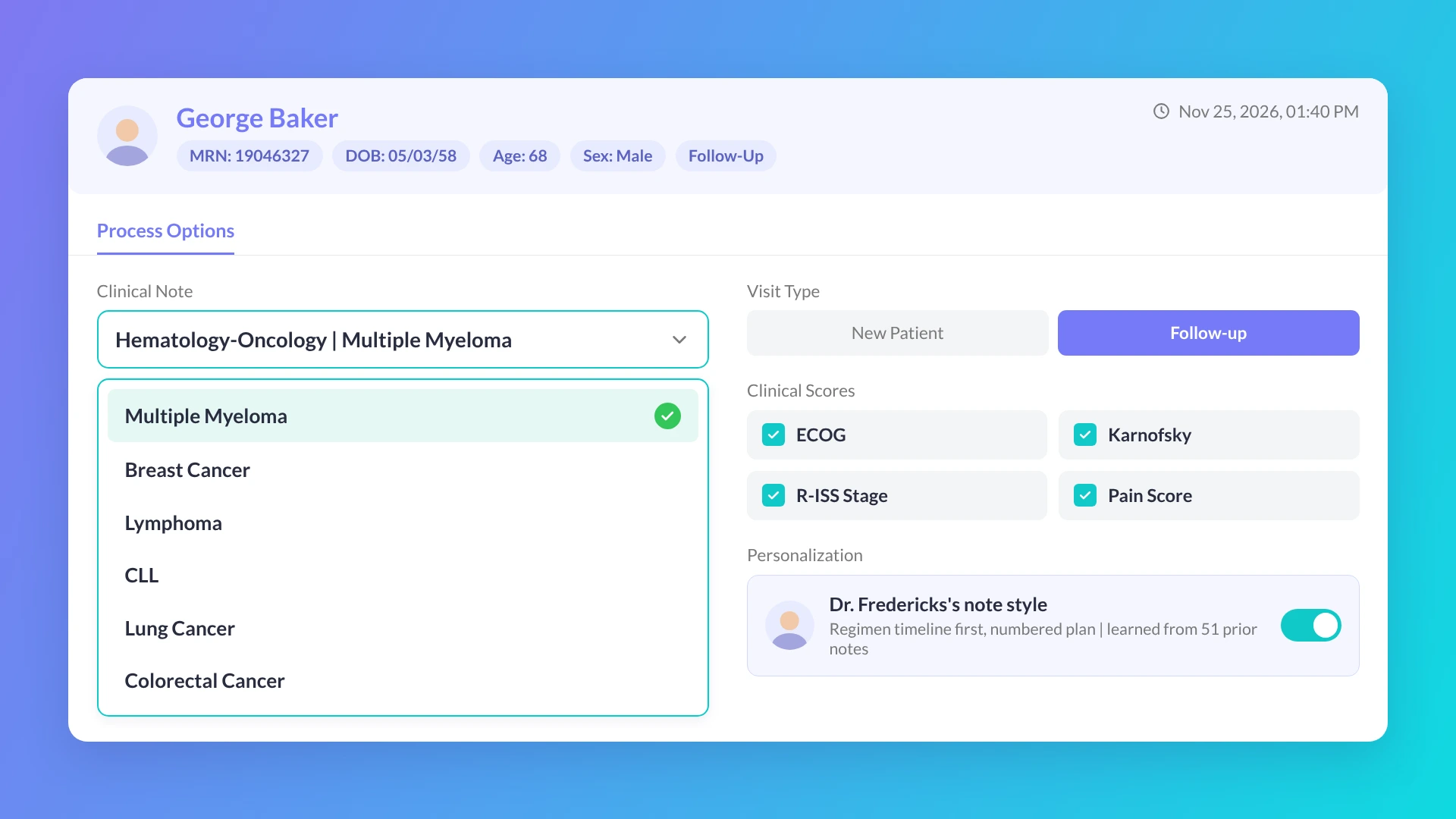
A note is only useful if it reads the way the doctor expects. A generic template leaves the doctor rearranging sections and rewording lines after every visit.
With Marvix AI, every provider in the practice gets their own custom note templates. Each template is built around the provider's subspecialty, the visit type and the condition being treated.
Marvix AI creates these templates by studying the notes the provider has already written. The notes it produces then follow that provider's formatting, phrasing and structure.
Since each draft already sounds like the doctor wrote it, there is little to edit before signing. The same templates also set the sections that are later pushed into iKnowMed.
Dr. Fredericks sees myeloma follow-ups and breast cancer chemotherapy visits on the same afternoon. Each visit type opens its own template in Marvix AI, shaped from her earlier iKnowMed notes. Her myeloma notes lead with lab trends, while her chemotherapy notes lead with the cycle count and side effects. She signs most of them after a quick read.
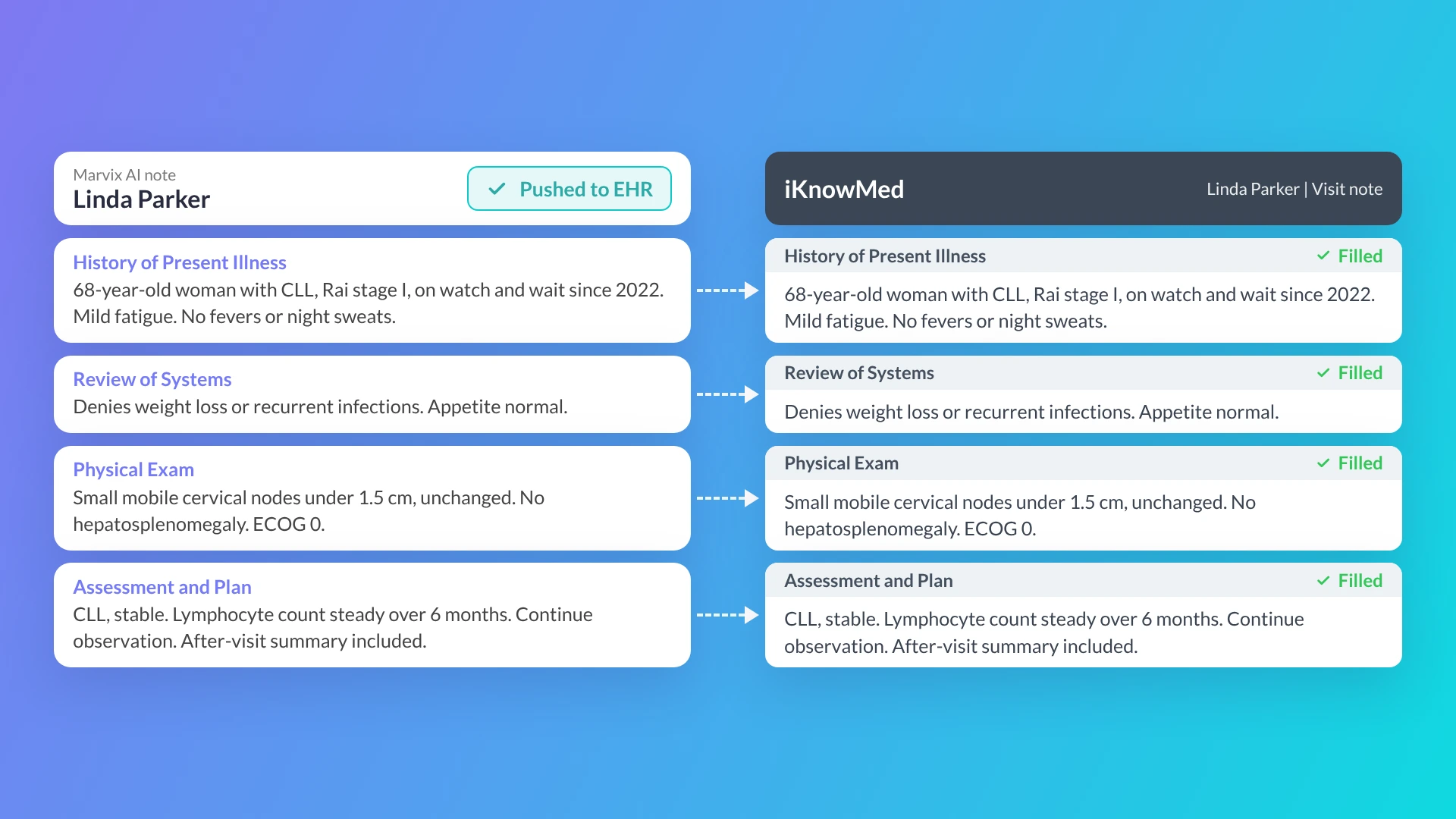
Marvix AI pushes the signed note into iKnowMed section by section. The history of present illness, review of systems, physical exam, and assessment and plan each land in their matching section or as preferred by the provider. The team sets this up for each provider. This ensures that the note looks the same in the EHR as it does in Marvix AI.
See how an oncology note is structured. Download a free SOAP note template, with a sample note:
→ Medical Oncology SOAP Note Template: treatment review, labs, assessment and plan, and billing considerations
→ Radiation Oncology SOAP Note Template: radiation dose, fractions completed, interruptions and follow-up
Dr. Fredericks signs her CLL follow-up note in Marvix AI after the consult. The assessment and plan lands in its matching EHR section, and the exam lands in the physical exam section. She never opens a blank note to paste text into it.
The after-visit summary tells the patient what was decided and what comes next. Marvix AI can place it inside one of the mapped sections of the note. The summary then travels with the note into the EHR, so it is stored with the visit.
Her lymphoma patient leaves with instructions about his next infusion and symptoms to watch for. The after-visit summary is placed inside the assessment and plan section. It reaches the chart with the note, attached to that day's visit.
When a doctor edits a note after the first push, Marvix AI lets them push it again. The re-push sends the latest ready note to the same appointment in iKnowMed. The chart always holds the final version, and nothing is copied in by hand or lost.
For busy oncology practices, where lab results and plans change through the day, this keeps the chart accurate after the consult ends.
At 4 PM, an outside lab result arrives for her 10:20 AM CLL patient. Dr. Fredericks updates the plan in Marvix AI and pushes the note again. The updated note lands on the same appointment, so the chart matches her final plan.
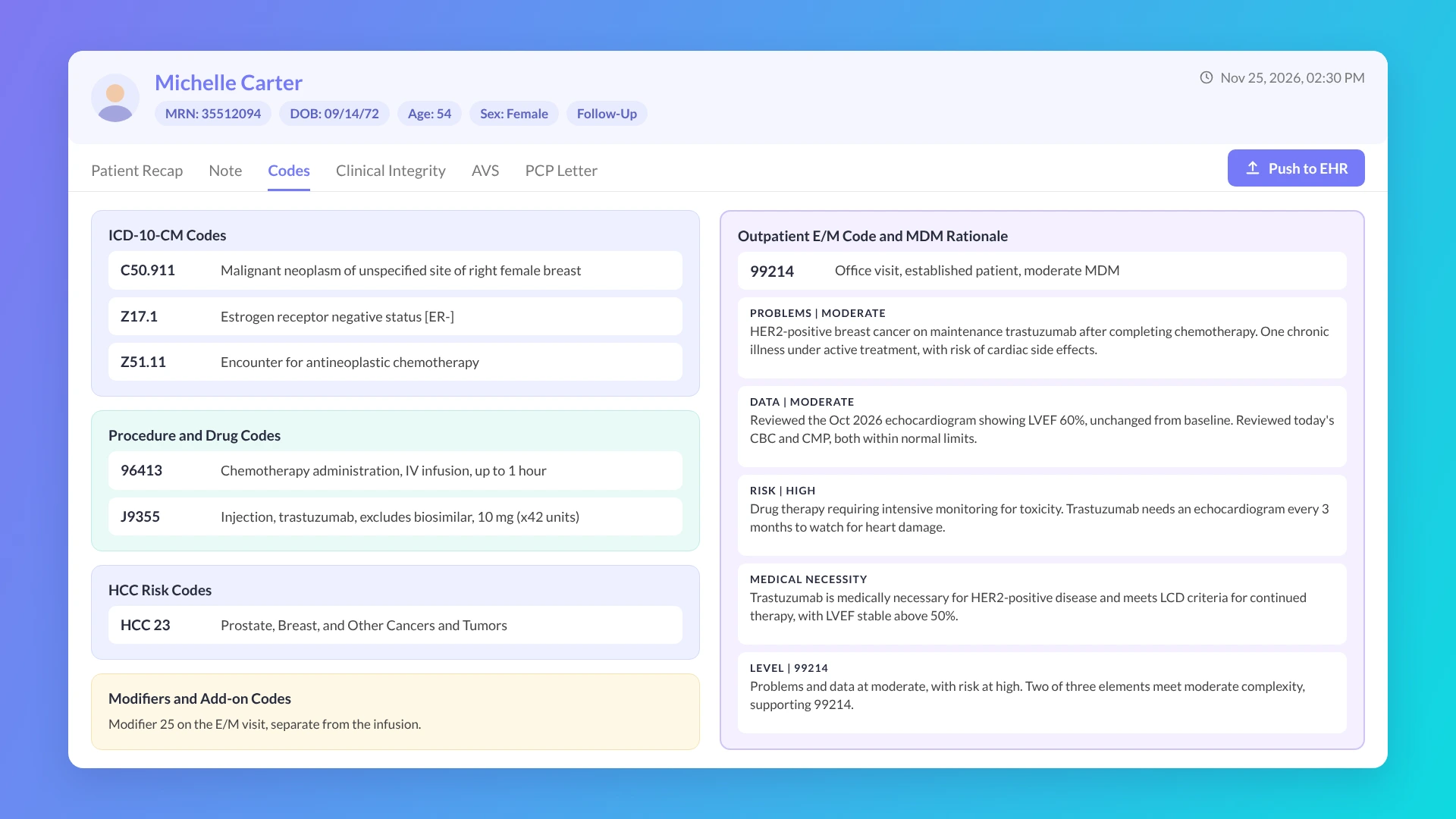
Oncology visits carry some of the highest documentation stakes. Marvix AI adds the details payers look for before the note reaches the EHR. It also produces every code the visit needs, each tied to the documentation.
Her breast cancer patient receives a targeted therapy infusion during today’s visit. Marvix AI adds medical necessity language explaining why the therapy continues, along with the matching J code. The E/M level arrives with its MDM rationale, so the note reaches the chart ready for the billing team.
Beyond the integration itself, Marvix AI brings oncology-specific features into every consult. Each one works alongside the workflow described above.
If you want to try Marvix AI out for you and your team, try a 30-day free trial which includes custom workflows and EHR integration setup for the entire team.
Oncology practices on iKnowMed need an AI scribe that works with the chart as closely as the consult. Marvix AI syncs each doctor's schedule and pulls prior notes and clinical documents before the visit. It summarizes years of treatment history and adds that context into today's note. After the consult, it pushes the note back section by section and sends later edits to the same appointment.
If earlier AI scribes added work for your team, the difference here is the integration. Oncology practices are already seeing results, as the MOHC case study shows with a 30% reduction in documentation time.
You can book a 30-day risk-free trial for your team, with complete setup and integration done for you today!


