


AI scribes have become a normal part of clinical documentation for many physicians. In athenahealth's 2025 survey, over two-thirds of physicians using AI said their use had grown. Its 2026 survey still lists excessive documentation among the top concerns physicians report.
With AI scribes this common, the real question is which one fits best which comes down to how closely the scribe works with your EHR. A good fit saves time for the whole team, before, during and after every visit.
Marvix AI is built for specialty care, integrates 2-way with athenaFlow and manages documentation throughout the day. This guide explains how it works inside athenaFlow at each step of the clinic day.
athenaFlow is the on-premises EHR from athenahealth, sold for years under the name GE Centricity. One of the distinct features of this EHR is that, each visit note is divided into sections, one for each part of the encounter. A note counts as finished only when every part has reached its proper section.
Therefore, an AI scribe for athenaFlow has to respect that layout. Before the visit, it should take the day's schedule and the patient's earlier notes from the EHR. Once the visit ends, it should draft the note and return each part to its own section.
Marvix AI is a specialty-specific AI scribe, with templates covering more than 135 specialties and subspecialties. Its 2-way athenaFlow integration brings schedules and prior notes in, makes a pre-visit summary and sends finished notes back out in their mapped section along with billing codes and its rationale.
Most AI scribes were built for short, general visits. Specialty care asks more of them, because each visit leans on the patient's history and a note structure the specialty expects.
If you are evaluating an AI scribe for athenaFlow, these are the capabilities that actually matter.
Here's a brief overview of what differentiates Marvix as one of the best AI scribes for athenaFlow.
The sections below show how Marvix AI handles each part of the athenaFlow workflow. One cardiologist's clinic day ties them all together.
Dr. Lily Fredericks is a board-certified cardiologist in independent practice, and her clinic runs on athenaFlow. On a typical day she sees around 22 patients, and returning patients fill most of her schedule. Their conditions range from heart failure and atrial fibrillation to coronary artery disease and hypertension.
Over the years, athenaFlow has collected their echo results and medication changes. Each follow-up asks her to recall that history quickly and get it right.
Documentation starts with knowing who is on the schedule. Marvix AI reads the appointment list from athenaFlow on its own, so the team never builds the day's queue by hand.
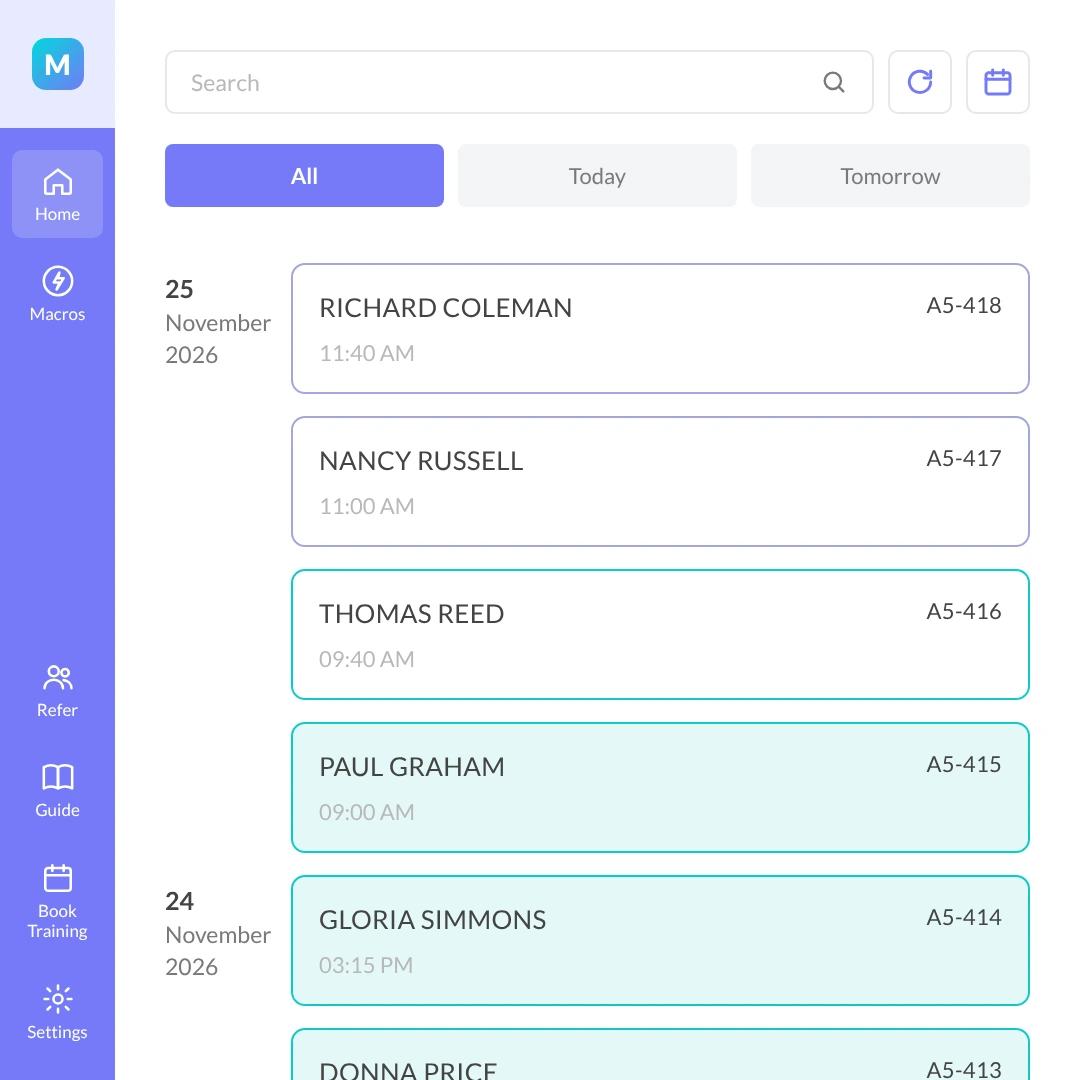
Every day, at fixed times, Marvix AI pulls the latest appointments from athenaFlow. No one has to import a file or refresh a screen to bring visits across. By the time the clinic opens, the queue in Marvix AI matches the day's bookings.
The patient's date of birth and gender come across with each appointment and tie every note to the correct patient.
The first sync of the day finishes before Dr. Fredericks arrives. At 8:15 AM, her 22 visits are listed in Marvix AI, each with the patient's date of birth and gender filled in. She starts charting straight away, with no list to check against athenaFlow.
New and returning patients call for different kinds of preparation. A new patient has no visit history at the practice yet, while a returning patient brings every earlier visit into the room.
As the schedule comes in, Marvix AI tags each appointment as a first visit or a follow-up. The tag tells the team which charts hold their history summaries which need reviewing.
Two new chest pain referrals on her schedule carry the first-visit tag. Her other 20 patients are tagged as follow-ups, and her team prepares those charts first.
Most specialty decisions depend on how a patient has done over time. Marvix AI gathers that history from athenaFlow and has a pre-visit summary ready before each visit.
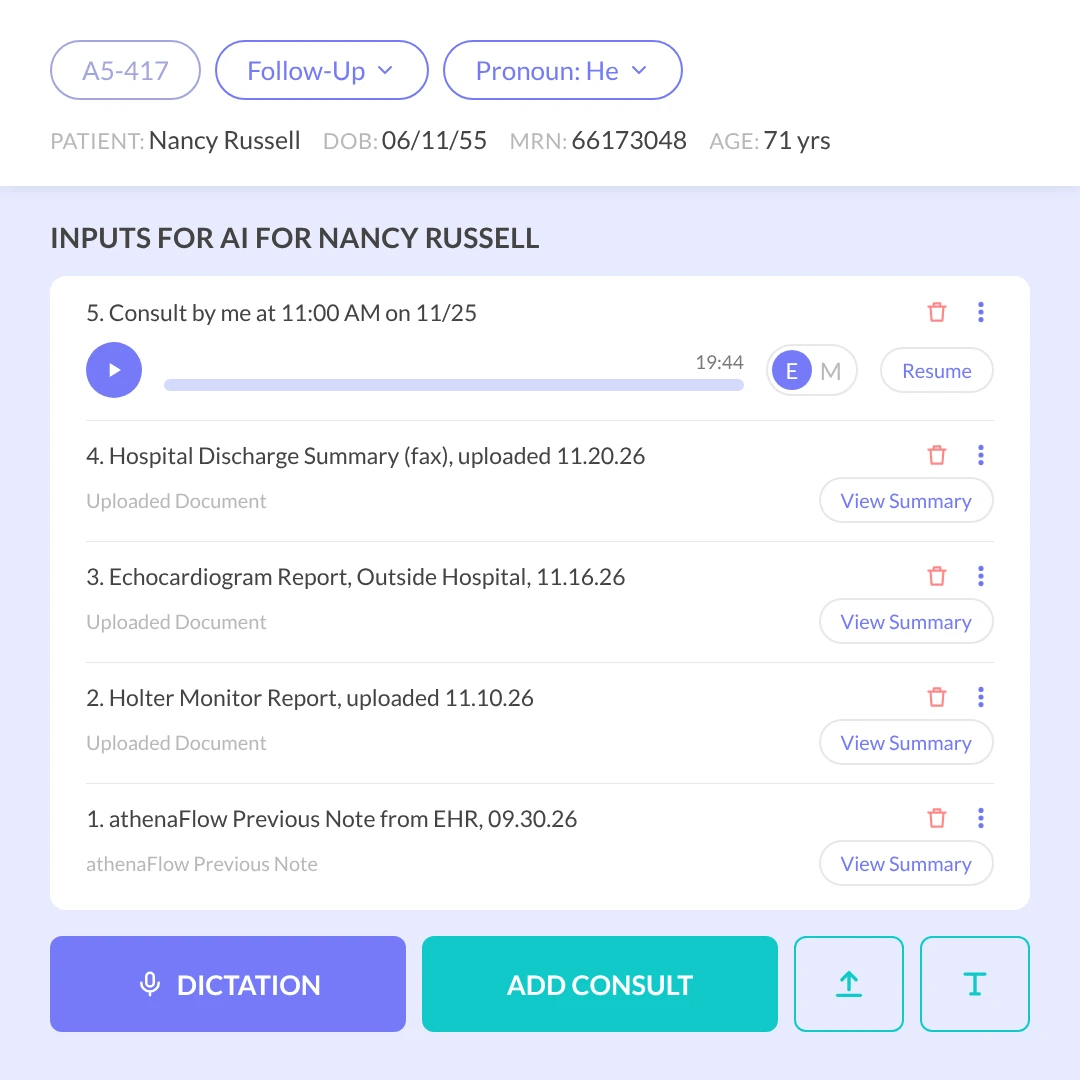
Each patient's earlier notes come over from athenaFlow automatically, together with their appointments. Because they arrive before the visit, the doctor can open the encounter and start reading at once.
Previous assessments, treatment plans and medication choices all sit in one view. Searching through old encounters for the last plan drops out of visit prep entirely.
Her 9:40 AM patient has heart failure, with nine visits recorded over two years. All nine notes are waiting in Marvix AI when she opens the chart. She follows every diuretic adjustment in a single view and walks in knowing what to ask.
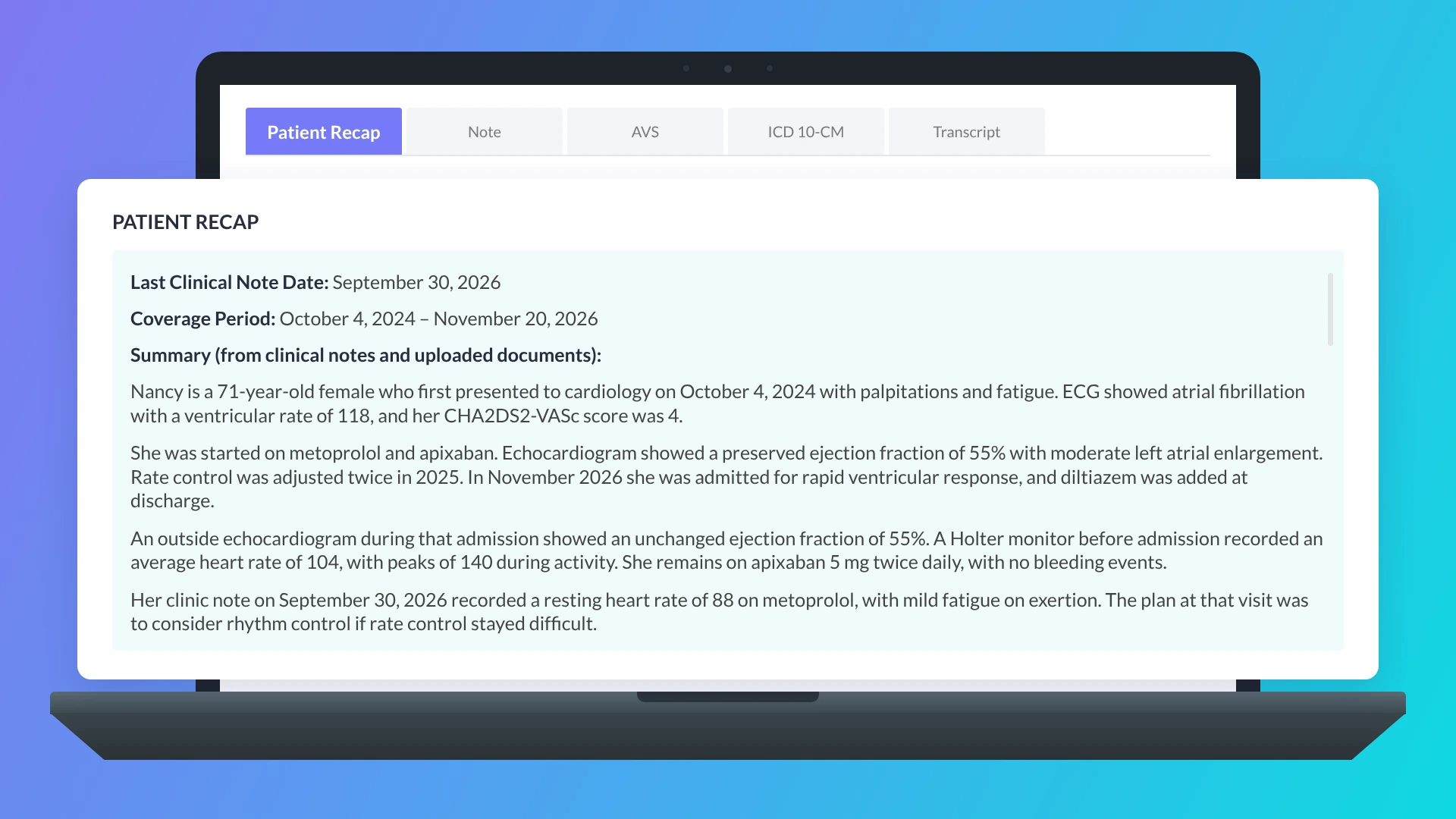
A returning patient’s notes can run for many pages over the years. On a full clinic day, the doctor has little time to read them all.
Marvix AI solves this by creating Patient Recaps which are chronological summaries of the patients' histories. These are made by summarizing prior notes pulled directly from athenaFlow.
Patient Recaps also includes documents the team uploads before the visit. These can be handwritten notes, faxes, outside reports, discharge summaries, or any other document in any format.
This longitudinal tracking is especially relevant for specialties like cardiology, nephrology, etc. which can have years of data about a patient and a doctor needs to keep track of it for every visit.
Her 11 AM patient with atrial fibrillation brings a faxed discharge summary from a recent admission. Her team uploads it during pre-charting. In the Patient Recap, that admission sits in date order alongside two years of clinic visits, so rate control changes and anticoagulation decisions read as one timeline.
Doctors seldom want their summaries to look the same. Marvix AI lets each provider decide how summaries are written:
The Marvix AI team handles this setup with each provider. From then on, every summary follows those preferences without any extra steps.
Dr. Fredericks likes short bullet summaries with a standard cardiovascular exam. The Marvix AI team set those preferences for her once. Every recap built from her athenaFlow notes now reads the same way, from her first patient to her last.
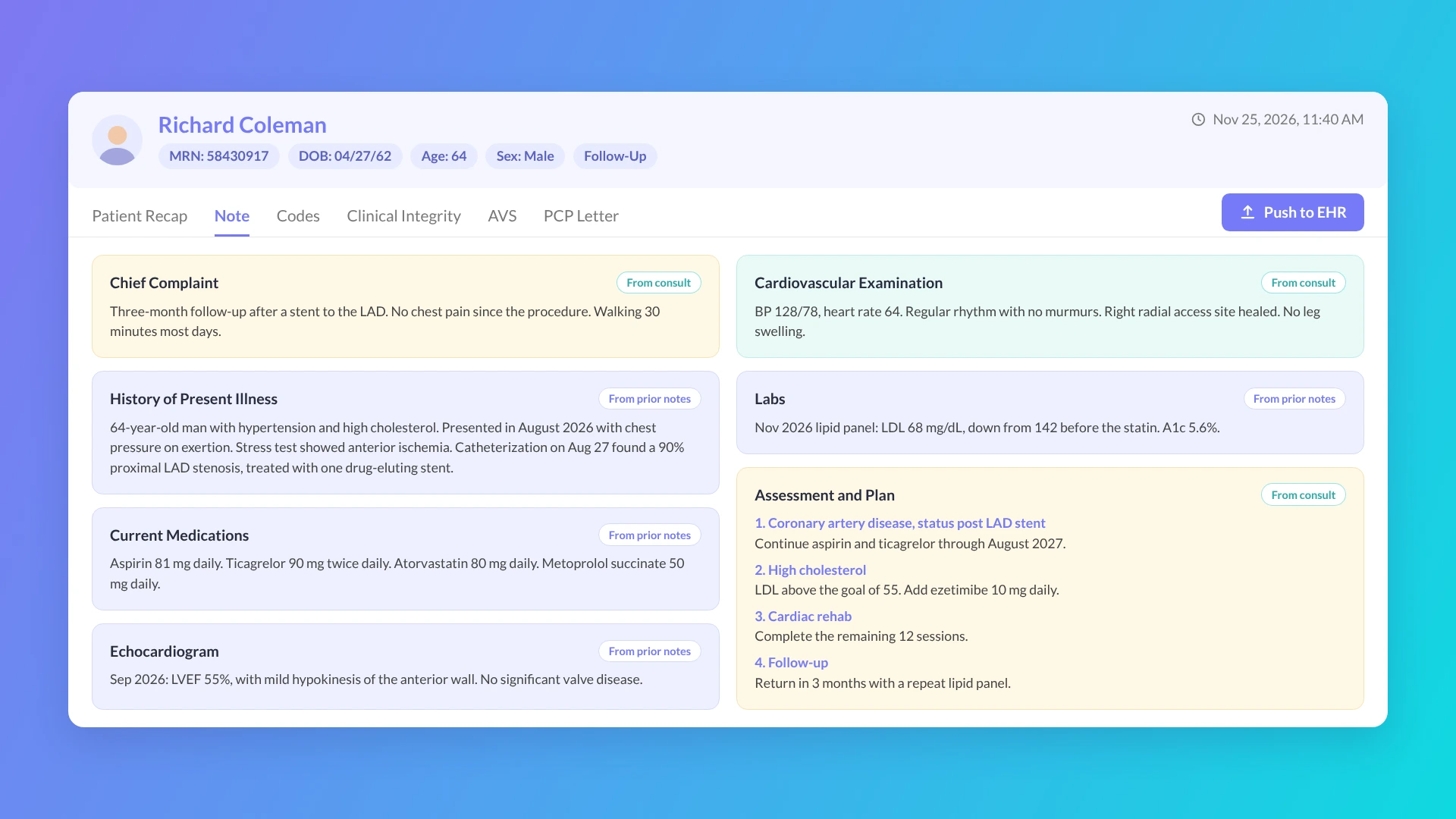
A follow-up plan makes more sense when the note explains what led to it. Writing that background by hand at every visit takes time the doctor rarely has.
Marvix AI solves this with the Composite Note. It combines what was said in today’s visit with the patient’s past history.
The history comes from the Patient Recap. That means it draws on prior notes pulled directly from athenaFlow and on documents the team uploaded before the visit.
Marvix AI selects only the history that matters for today’s visit. This can include past assessments, earlier treatments, medication changes and previous results.
All of this happens automatically, so nobody copies or retypes history from old notes. The finished note explains today’s plan on its own, and the history supports the medical decision-making behind it.
The doctor reviews the Composite Note and can edit it before signing.
Three months after a stent placement, her coronary artery disease patient comes back for follow-up. The Composite Note includes a brief account of the procedure and the medication changes since. With the background already written, the visit can center on how the patient feels now.
A note only becomes useful once it is delivered correctly in the EHR. athenaFlow keeps each part of a note in its own section, and Marvix AI delivers notes to match those sections.
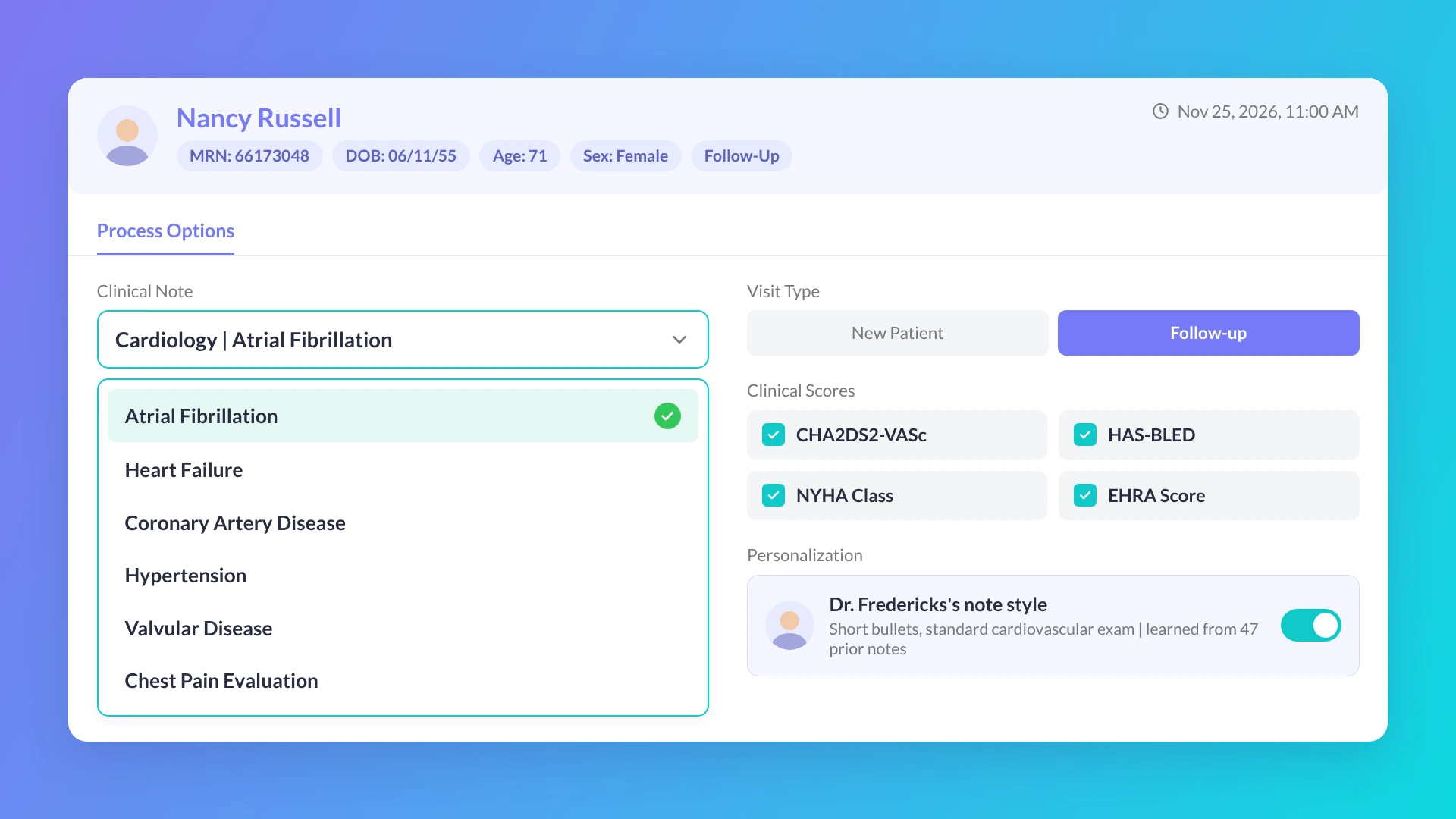
Every doctor documents in their own way, and a note that ignores this has to be reworked before it can be signed.
Every provider in the practice gets their own custom note templates, built around their subspecialty, the type of visit and the disease being treated.
These templates are created by studying the provider's previous notes. So every note Marvix AI writes follows that provider's own formatting, phrasing and structure. It reads like the doctor wrote it, which means far less editing before signing.
Dr. Fredericks's heart failure visits track weight changes and medication doses closely. Her atrial fibrillation visits focus on heart rate control and anticoagulation. Each visit type has its own template in Marvix AI, shaped from the notes she has written in athenaFlow over the years. Her drafts come back in her usual layout, so she reviews and signs them quickly.
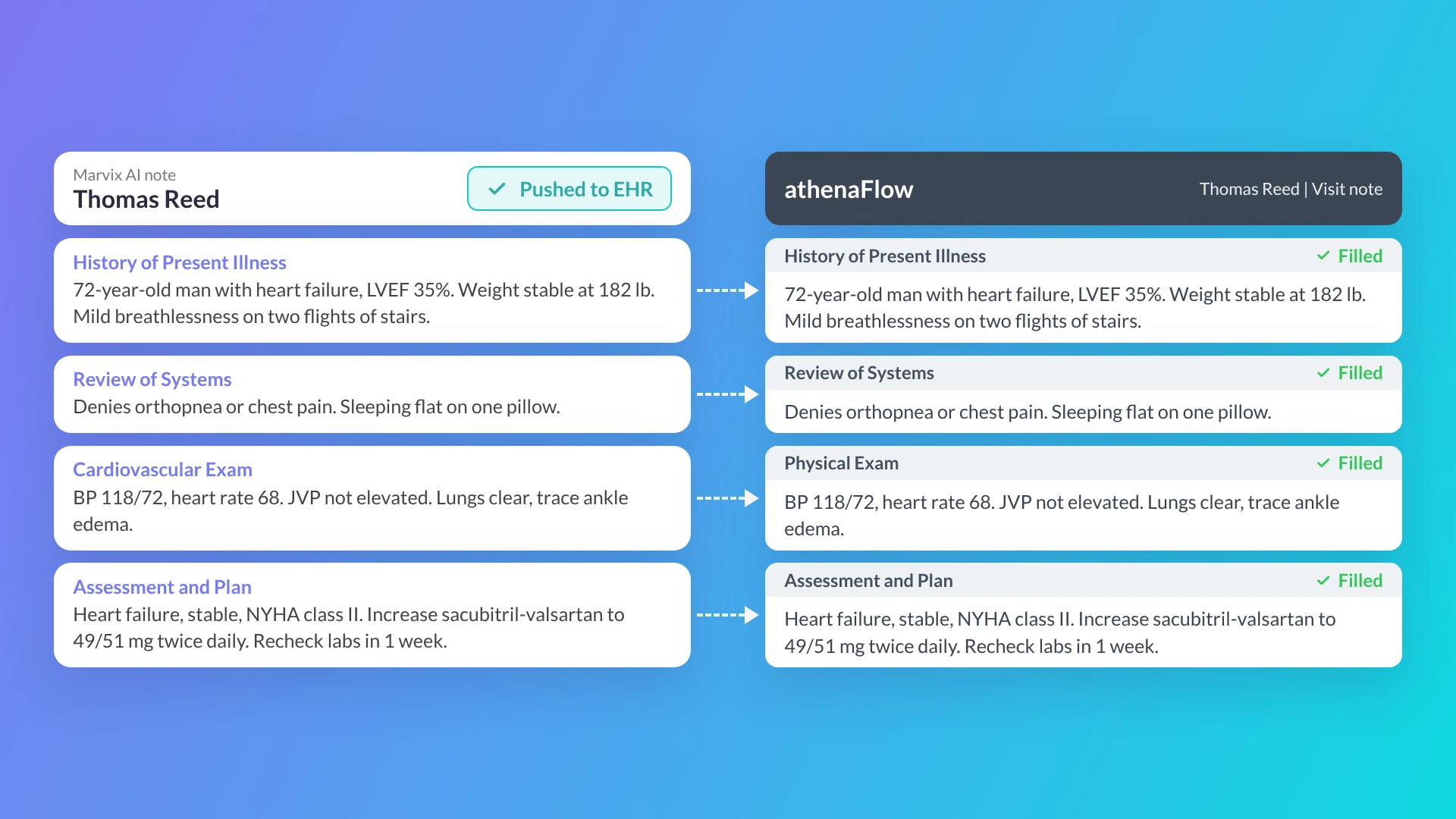
athenaFlow stores each part of a visit note in its own section. When a scribe hands back one long block of text, someone on the team ends up cutting it apart and pasting each piece into place. Marvix AI avoids this by pushing the note section by section.
During setup, the Marvix AI team links every section of these templates to its matching athenaFlow section. It's done once, and every note after that follows the same path.
After the note is finalized, Marvix AI pushes it into athenaFlow section by section, and each part lands exactly where it belongs. The note is complete in the chart, with no copying or rearranging left for the team.
Her cardiology template has sections for the HPI, review of systems, cardiovascular exam, and assessment and plan. Once she signs her heart failure follow-up, each one appears in the matching athenaFlow section. The same happens across all 22 visits, so she never pastes text into athenaFlow by hand and her after-hours editing has dropped by a significant amount.
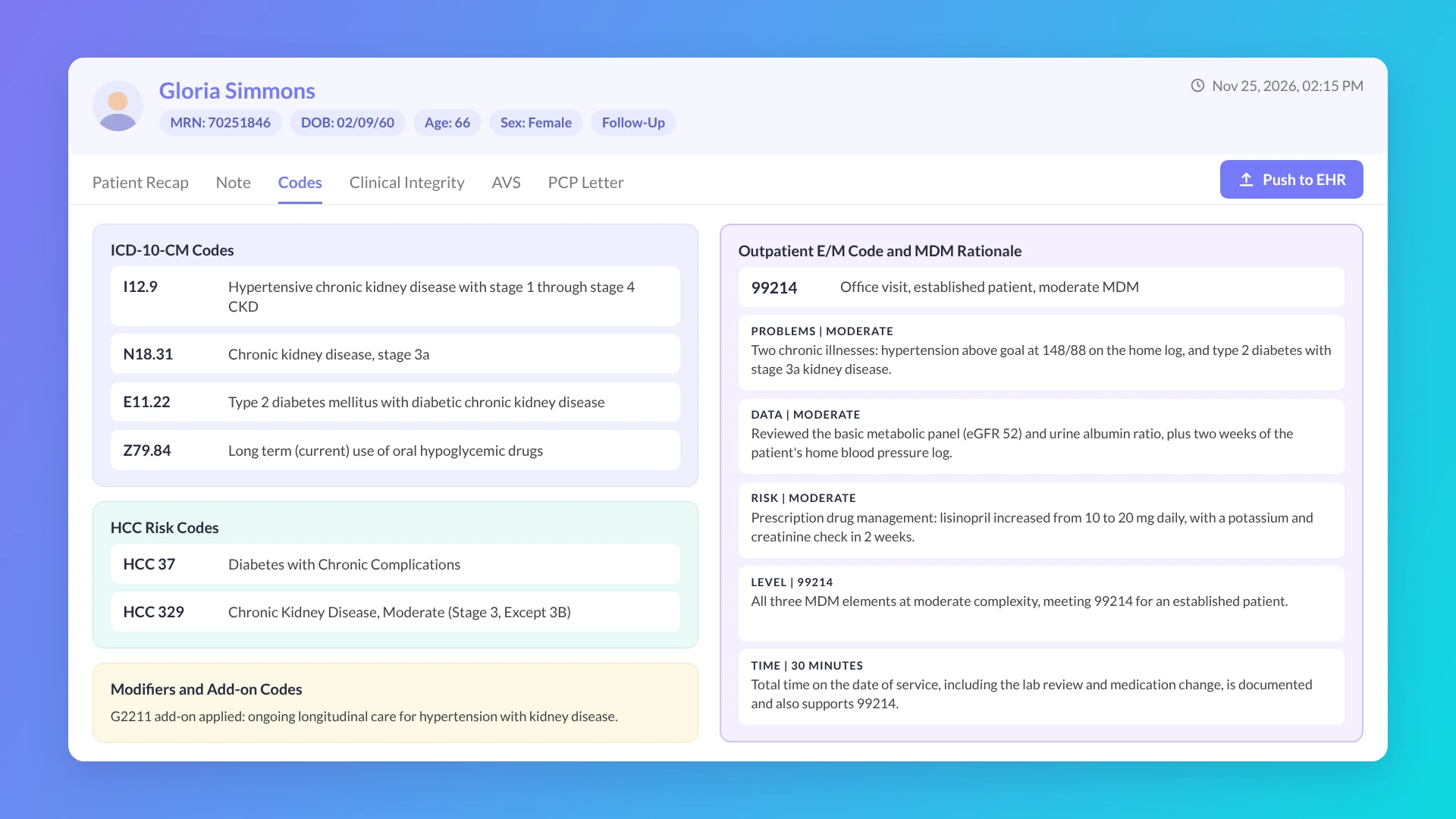
Specialty visits often involve several conditions and detailed decisions. Coding them by hand takes time, and errors can hold up payment. Marvix AI's Automated Billing Code Generation builds the codes from the note itself, so the documentation backs each one.
Her hypertension patient also has type 2 diabetes and chronic kidney disease. Marvix AI assigns an ICD-10-CM code to each diagnosis and sets the E/M level with its MDM rationale. Her billing team reviews codes that already show their reasoning.
Marvix AI also brings tools that support specialty documentation beyond the integration itself.
On security, Marvix AI holds SOC 2 Type II certification and meets HIPAA requirements. Patient data is encrypted both in storage and in transit. Practices can set their own data retention rules, and customer PHI is never used to train shared models.
If you want to try Marvix AI out for you and your team, try a 30-day free trial which includes custom workflows and EHR integration setup for the entire team.
Choosing an AI scribe for athenaFlow is mostly a question of integration. Marvix AI brings in the schedule each day and the patient's prior notes before every visit. It turns that history into a summary written the way each doctor prefers. Once the note is signed, it goes back into athenaFlow with every section in place.
The clearest test is a trial on your own workflow and your own templates. You can book a 30-day risk-free trial for your team, with complete setup and integration done for you today!


