


Cerner, now part of Oracle Health, runs the charts for many health systems and the specialty clinics within them. In those clinics, a returning patient's history often spans years of earlier visits.
Specialists need that history in front of them before each visit. They also need the finished note in the chart before the day ends.
An AI scribe only saves time if it works closely with Cerner on both of those jobs. Marvix AI was designed for specialty practices and connects with Cerner in both directions. The sections that follow walk through how it works with Cerner, from the morning schedule to the filed note.
An AI scribe for Cerner needs to link up with it on both sides of the visit. Ahead of the appointment, it reads the schedule and the patient's chart history. When the appointment is over, it writes the note and pushes it into the patient's Cerner chart.
Marvix AI is designed for specialty practices and comes with custom templates for over 135 specialties and subspecialties. Through its 2-way Cerner integration, it takes in schedules and prior notes and prepares a summary before each visit. When the visit ends, it files the note into the Cerner chart in the doctor's own format, with billing codes and rationale included.
Most AI scribes were built to write a note and stop there. A specialty practice on Cerner needs more, because each visit depends on both the patient's history and the chart.
If you are evaluating an AI scribe for Cerner, these are the capabilities that actually matter.
Here's a brief overview of what differentiates Marvix as one of the best AI scribes for Cerner.
Each section below covers one step of the Cerner workflow, in the order it happens.
Meet Dr. Daniel Reyes, a board-certified orthopedic surgeon at a multispecialty group that uses Cerner. He sees around 25 patients a day, and follow-ups make up most of his clinic.
His patients come in with knee osteoarthritis, rotator cuff tears, ACL injuries and lower back pain. Many are returning after surgery, a series of injections or months of physical therapy.
Cerner holds years of their imaging reports, operative notes, injection records and therapy plans. To plan each visit well, he needs that history clear in his mind before he walks into the room.
Every documented visit begins as an appointment on the schedule. Before Marvix AI can prepare anything, it needs to know which patients are coming in each day.
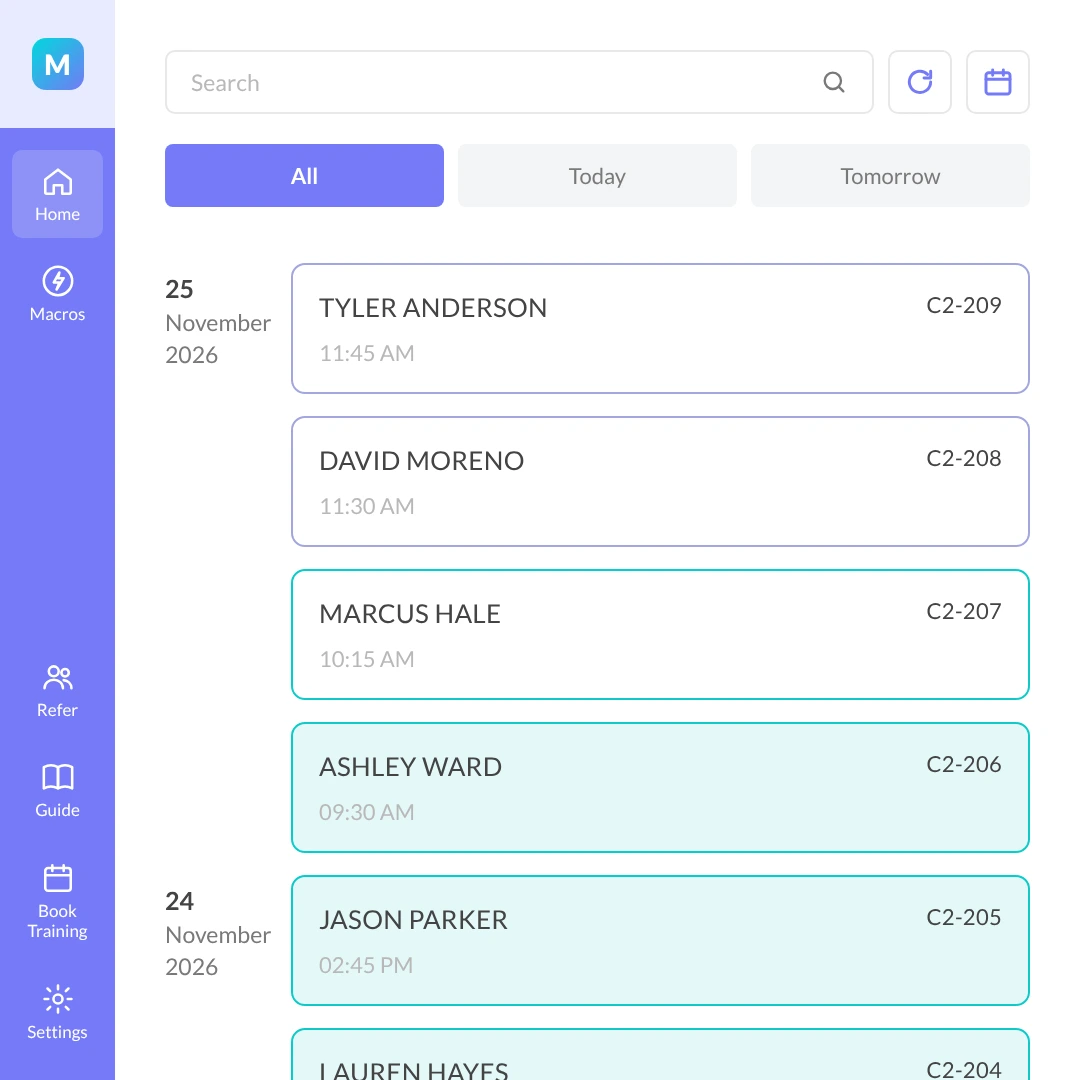
Marvix AI pulls the appointment schedule from Cerner every day at fixed times which is defined by the doctor and setup by the Marvix AI team. Each pull brings in the latest bookings, so nobody on the team imports or retypes a visit. By the time the clinic opens, every appointment for the day is lined up in the Marvix AI queue.
Each appointment brings the patient's date of birth and gender with it. These details are saved to the note automatically, so nobody types them in again.
The appointment also carries its visit type. This tells the doctor why the patient is coming in, whether for a new concern or for follow-up care. Preparation can then match the visit.
At 8:30 AM, Dr. Reyes opens Marvix AI and finds his day's appointments already queued from Cerner. Each one lists the patient's date of birth, gender and visit type. He sees that three are new patients and the rest are follow-ups, so he plans his morning around them.
Chart review takes up much of the time before each visit. Marvix AI collects the patient's history from Cerner and turns it into a pre-visit summary ahead of the appointment.
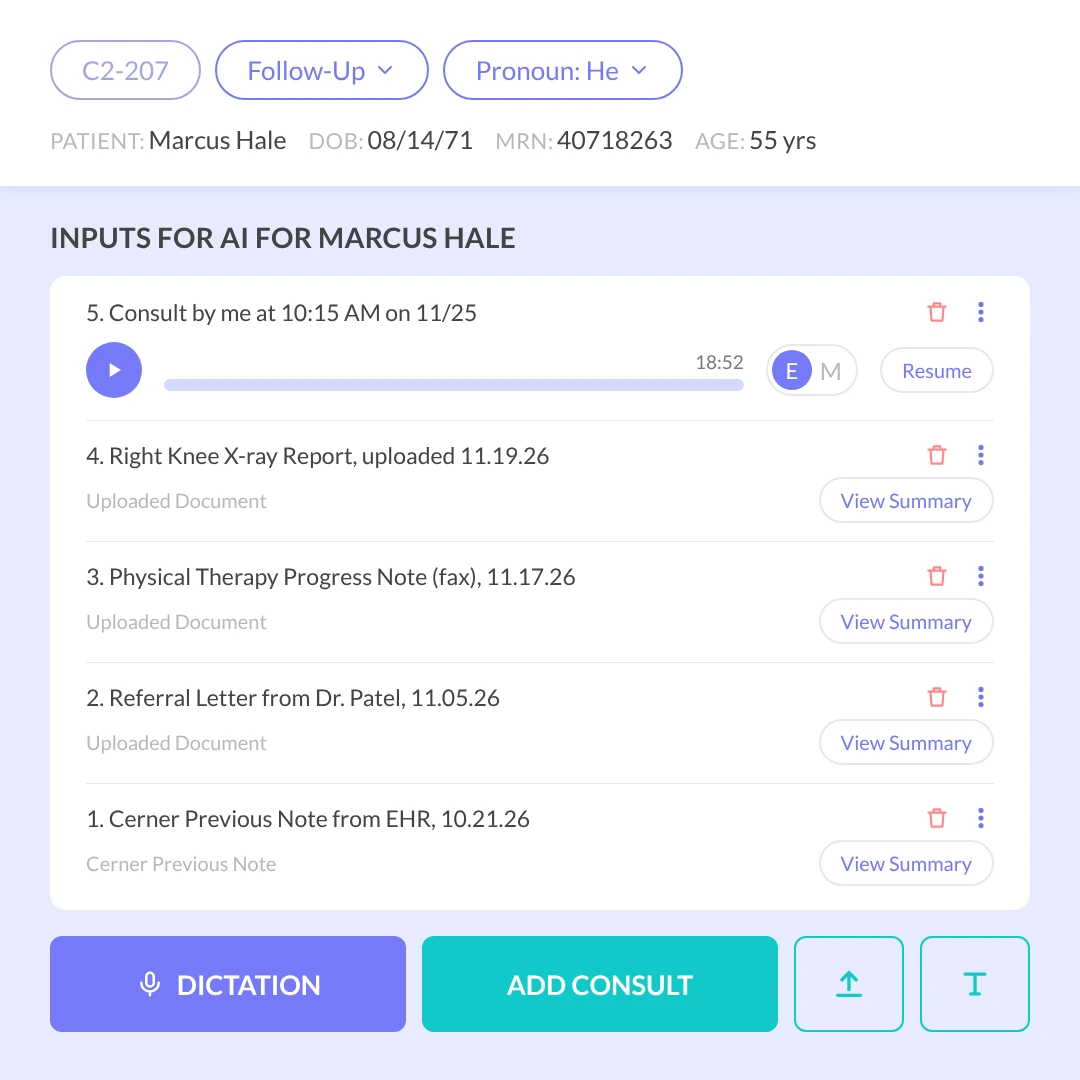
Marvix AI pulls each patient's previous notes from Cerner ahead of the visit. When the doctor opens the encounter, past assessments and plans are already there. The doctor sees what was decided last time without hunting for it.
A patient is back for a six-week check after a rotator cuff repair. Every earlier note for that shoulder is waiting in Marvix AI when Dr. Reyes opens the encounter. He sees the surgical details and the last therapy plan without leaving the visit.
Some patients have been coming to the practice for years, and their notes pile up with every visit. Reading all of them before an appointment doesn’t make sense for a busy day.
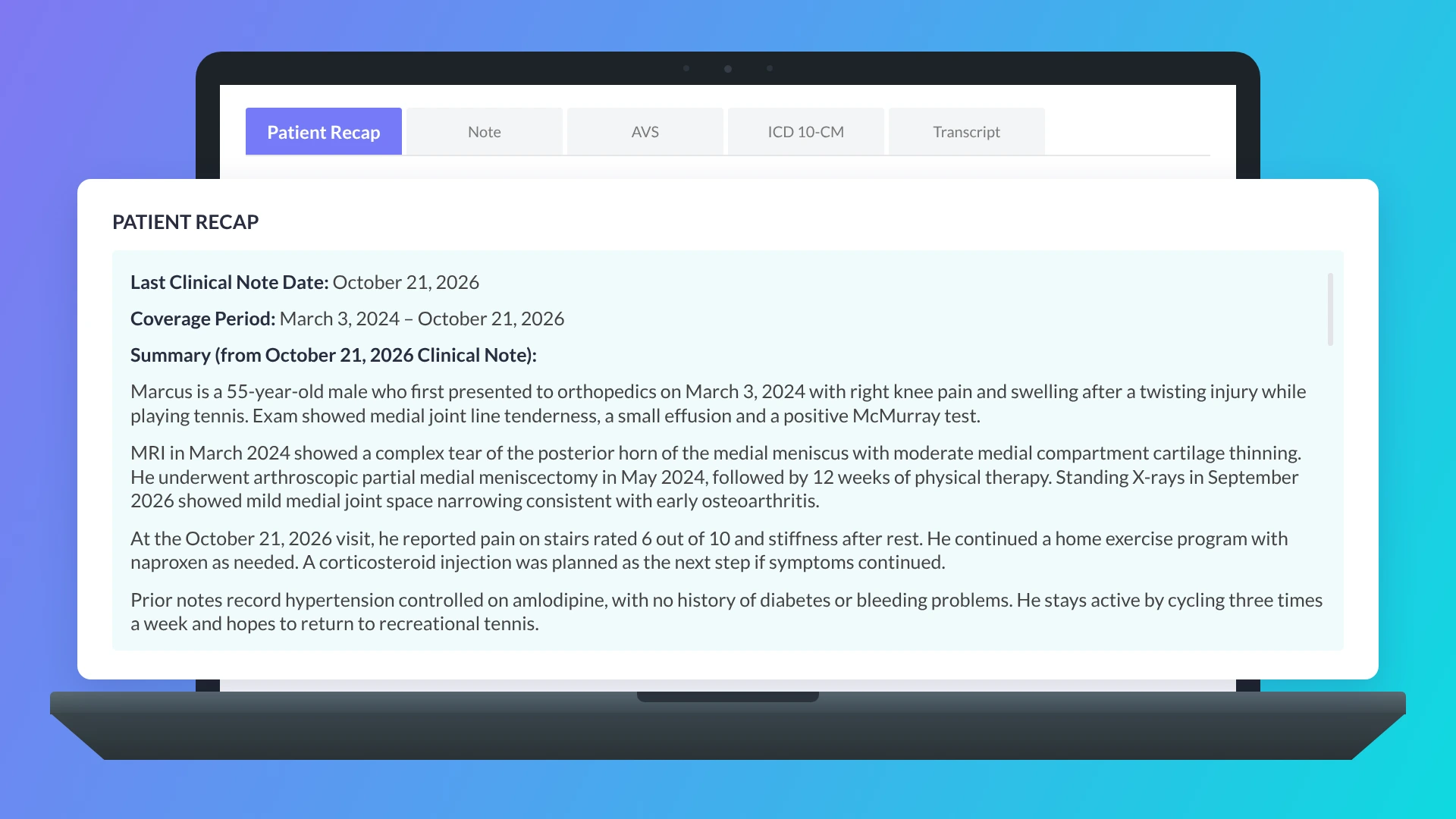
Marvix AI handles this with Patient Recaps. A Patient Recap is a chronological summary of everything the patient's notes record.
Marvix AI builds it from the prior notes pulled directly from Cerner. The team can add more information before the visit by uploading documents in any format. Outside imaging reports, faxes, handwritten notes and discharge summaries all fit into the same timeline. They can also add dictations which are timestamped and attributed to the right member of the team.
In orthopedics, this lays out a joint's full history in one place, from the first injury through the latest procedure. Learn more about how the AI Summarizer works.
A patient returns after an 18-month gap with new pain in the same knee. The Patient Recap lists the original diagnosis, the plan from the last visit and what has changed since. Dr. Reyes reads it in the hallway and walks in knowing where to start.
Some doctors want a quick scan, while others prefer the full story in paragraphs. Each provider sets how their Patient Recaps look like in their own format and structure. Some preferences include:
The Marvix AI team puts these settings in place at setup. From the first recap onward, they apply without the doctor touching them.
Dr. Reyes asked for brief bullet recaps that include his standard musculoskeletal exam. The Marvix AI team set this up once. Each recap he opens now follows the same layout, whether it's his first patient or his twentieth.
Today's plan often depends on what happened at earlier visits, such as a past surgery or a treatment that didn't work. Adding that background to every note by hand eats into the doctor's time.
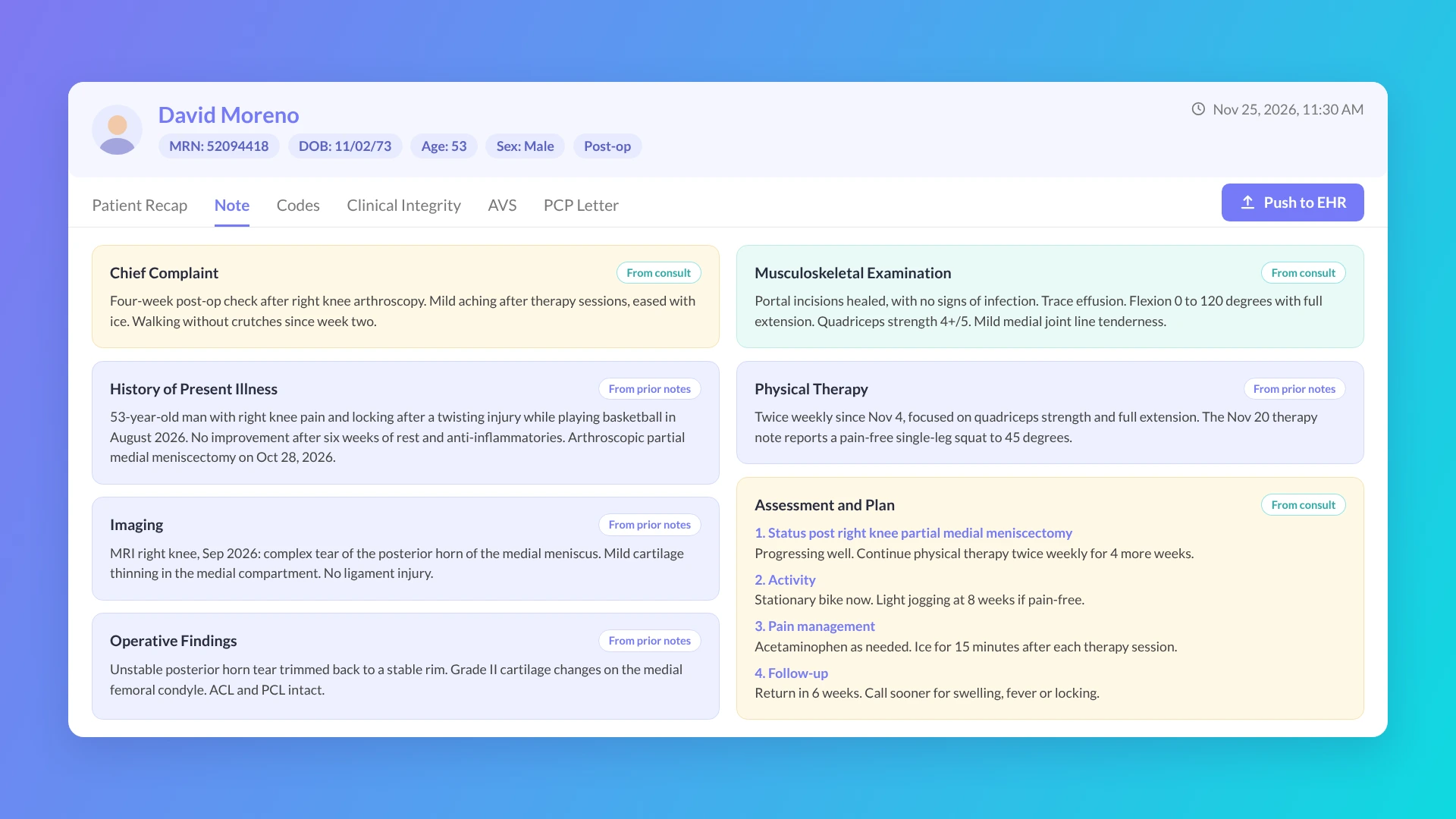
The Composite Note takes care of it. Marvix AI listens to the conversation from today's visit and adds relevant information from the patient's history in the current visit’s note in the right note sections such as A/P, HPI etc.
That history comes from the Patient Recap. It may cover earlier diagnoses, past procedures, medication changes or prior imaging.
No one has to copy it from older notes. Before approving, the doctor reads the Composite Note and edits anything that needs it.
His knee patient returns four weeks after an arthroscopy. The Composite Note adds a brief account of the procedure and the therapy plan since. Dr. Reyes can focus the visit on the range of motion and pain, since the history is already in the note.
Once the visit is over, the note has to reach the patient's chart. Marvix AI files it directly in Cerner, so the doctor never moves text between windows.
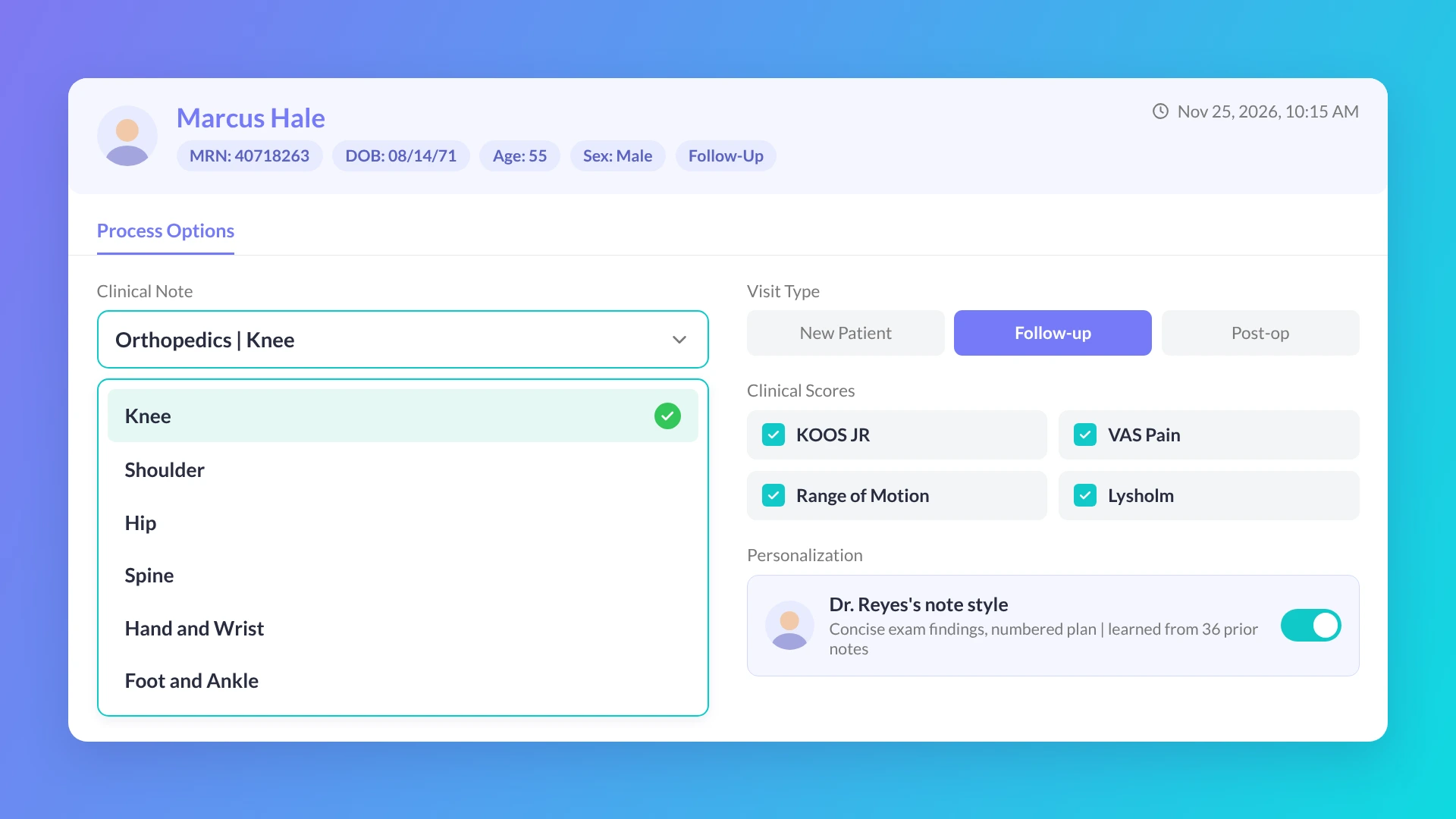
Marvix AI sets up custom note templates for every provider in the practice. Each template matches the provider’s subspecialty, a visit type and a specific condition.
To build them, Marvix AI studies the notes that the provider has already written. The notes it produces then carry that provider's formatting, phrasing and structure.
For Dr. Reyes, that means each note opens with the side and joint, then moves through the assessment and plan in the order he prefers.
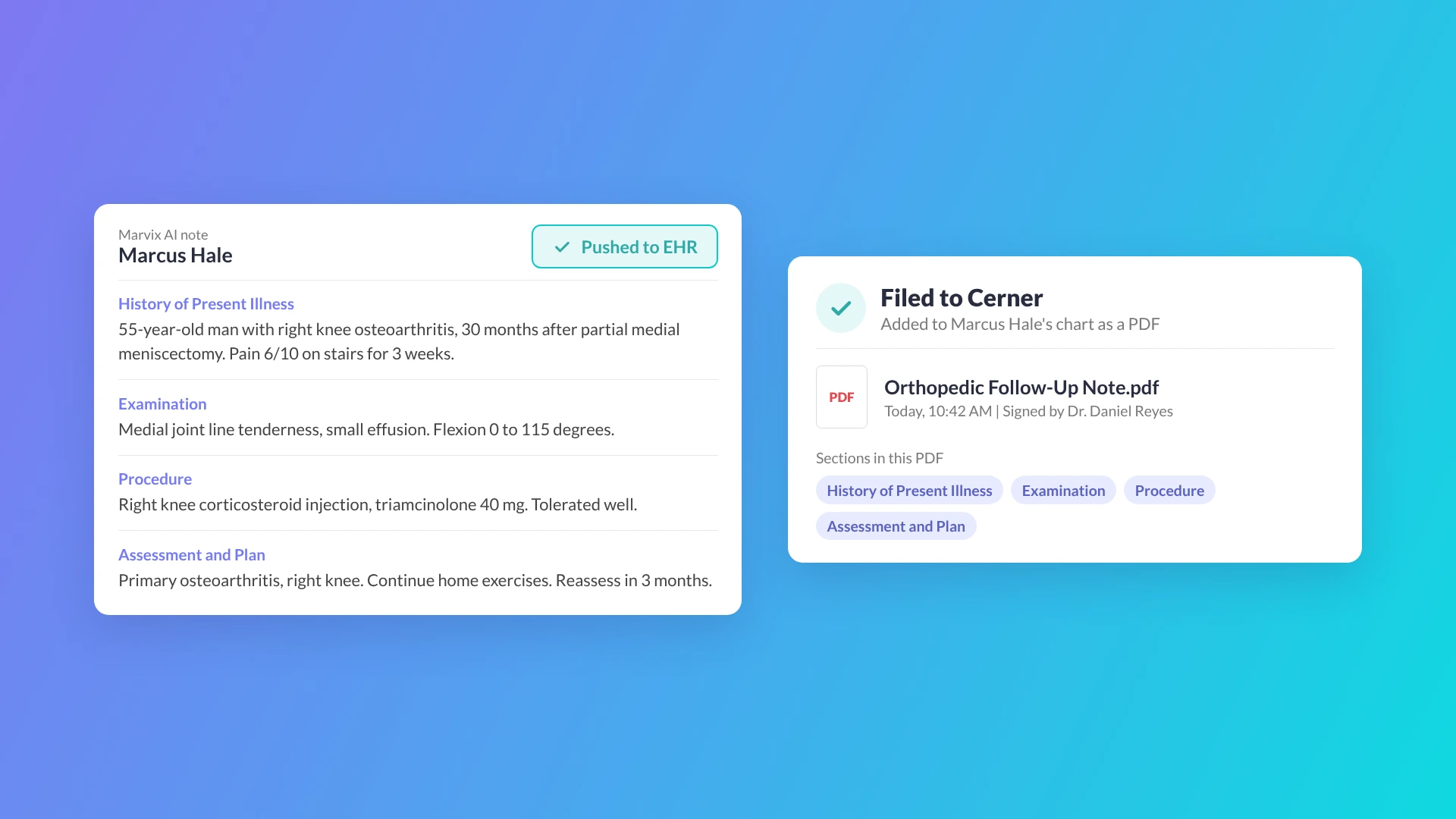
After the visit, Marvix AI writes the note from the conversation using the provider's template. The doctor reviews the note and makes any edits before approving it.
Once approved, Marvix AI files the note into the patient's Cerner chart as a PDF. Because Marvix AI builds the PDF itself, any field can be included in the note. The headings, their order and the fields shown all follow the doctor's preferred format.
After a knee follow-up, Dr. Reyes opens the finished note in Marvix AI. It follows his usual headings and order, written in his own phrasing. He makes one small change to the plan and approves the note. The PDF is filed in the patient’s Cerner chart, and he moves straight on to his next patient.
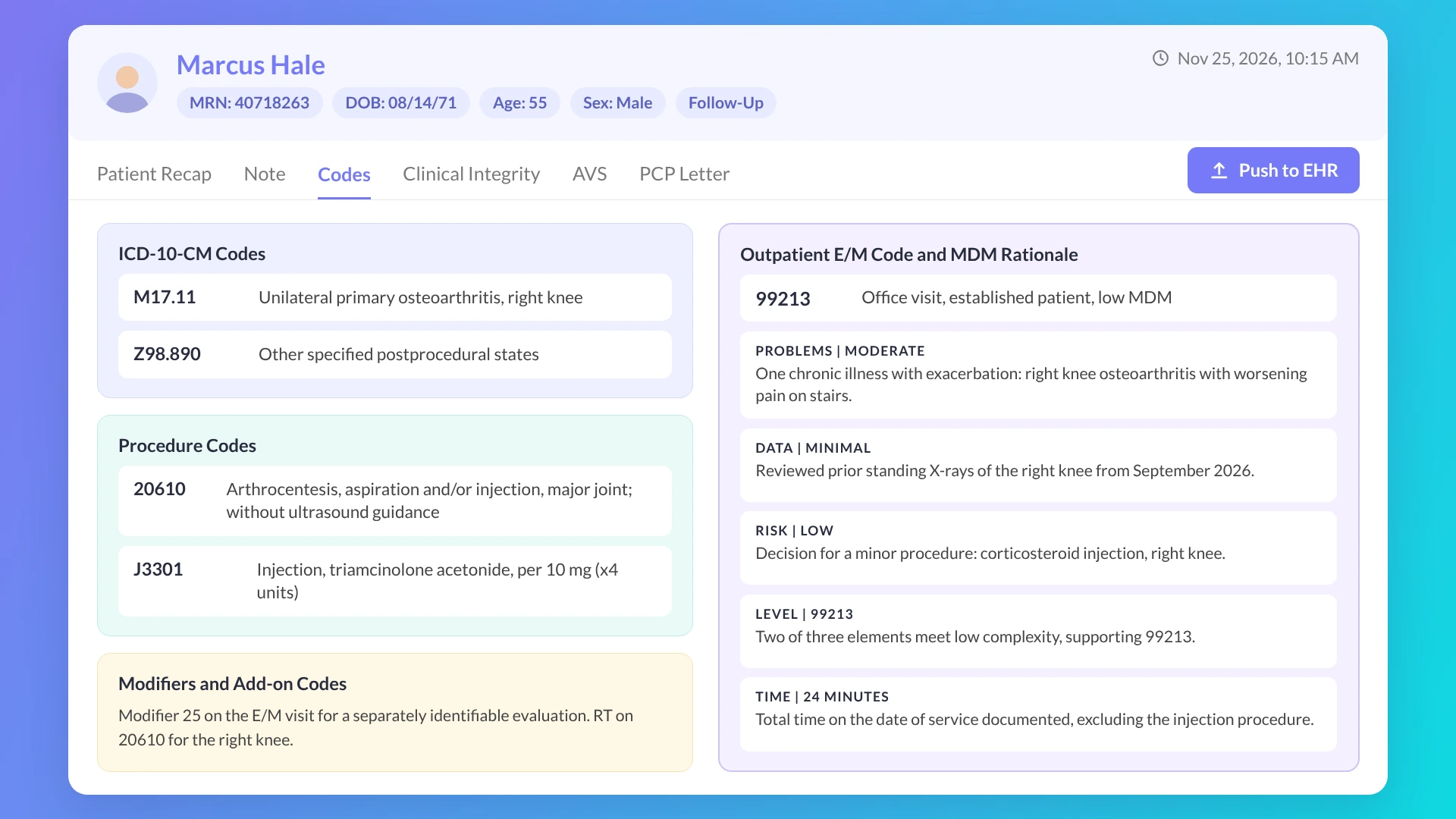
Specialty visits often cover several diagnoses and procedures in a single appointment. Each one needs the right code, and every code needs documentation that supports it.
Marvix AI’s Automated Billing Code Generation reads the finished note and assigns those codes. In orthopedics, for instance, an exam and an injection in the same visit each get their own code.
During a follow-up, his osteoarthritis patient gets a corticosteroid injection in the knee. Marvix AI sets the E/M level with its MDM rationale and adds the injection's CPT code with the correct modifier. The billing team can see the support for each code before submitting the claim.
Marvix AI also brings tools that support specialty documentation beyond the integration itself.
For security, Marvix AI meets HIPAA requirements and holds SOC 2 Type II certification. Data is encrypted at rest and in transit, and customer PHI is never used to train shared models.
If you want to try Marvix AI out for you and your team, try a 30-day free trial which includes custom workflows and EHR integration setup for the entire team.
Using another EHR as well? See how Marvix AI works with eClinicalWorks.
For a Cerner practice, the right AI scribe is the one that works hand in hand with the chart. Marvix AI keeps the schedule current each day and gathers prior notes ahead of every visit. It condenses that history into a Patient Recap shaped to each doctor's preferences. After the doctor approves the note, Marvix AI files it in Cerner, laid out the way they write.
The best way to judge it is on your own schedule and your own notes. You can book a 30-day risk-free trial for your team, with complete setup and integration done for you today!


