
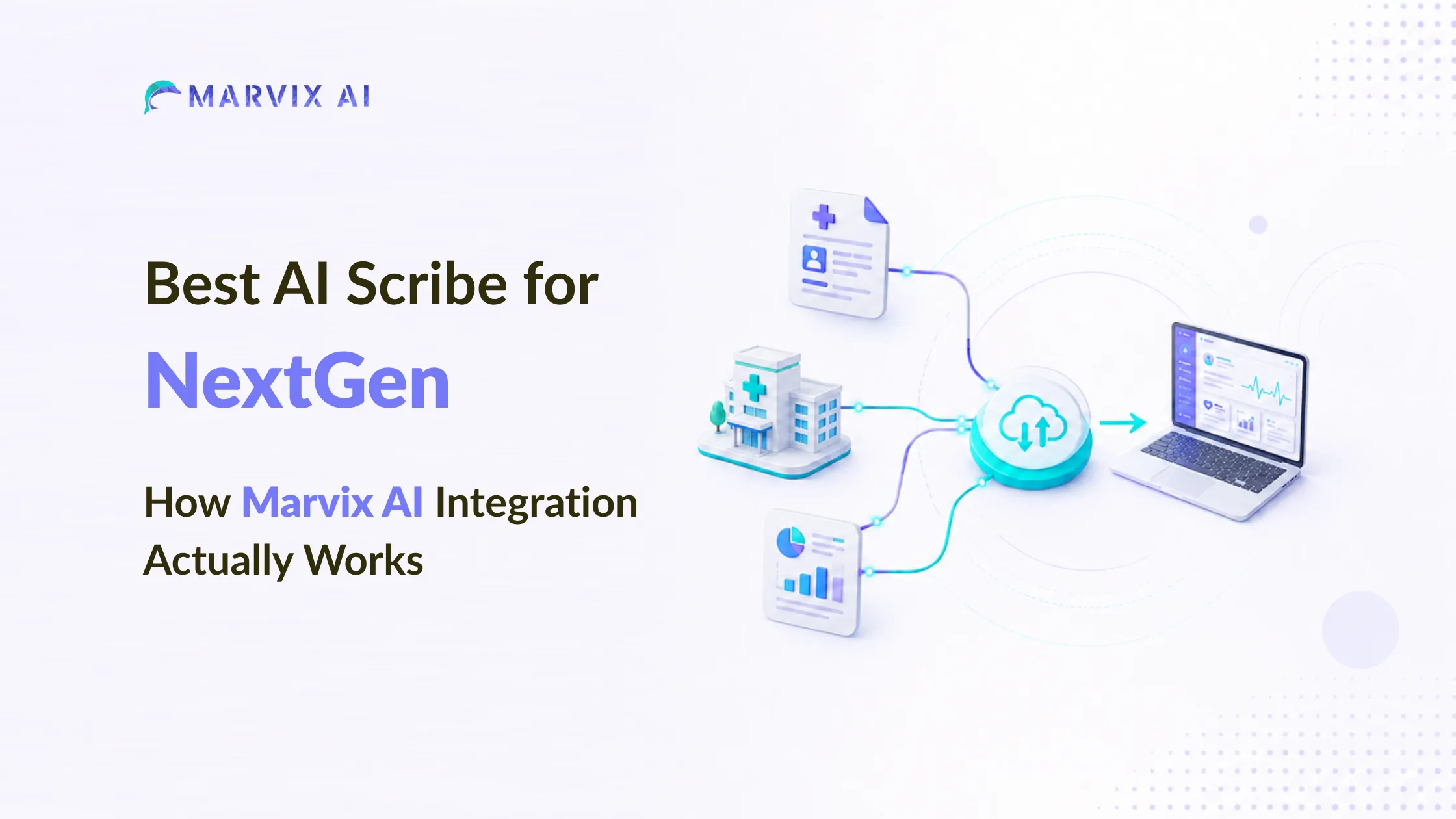

NextGen's EHR serves more than 40 specialty markets. It includes more than 2,000 clinical workflows across 30 specialties. Each workflow is built around a specialty's own process and the details it needs to capture. In a large user survey, practices named these specialty modules as one of NextGen's strengths.
Because the EHR captures specialty-specific detail, the notes need to carry that detail too. Every specialty documents its visits in its own way. A neurology note, for instance, tracks seizure frequency and records a detailed neurological exam. A cardiology note focuses instead on echo findings and ejection fraction. Doctors in the same specialty also tend to write their notes differently.
So when an AI scribe produces a generic note with a generic template, the doctor has to rework it before signing. A NextGen practice needs a scribe that writes with that same specialty depth.
Marvix AI is designed for specialty care and connects with NextGen in both directions. This guide walks through how it works at each step of a NextGen clinic day.
An AI scribe turns the conversation in the exam room into a clinical note. In a NextGen practice, that note also has to work with NextGen itself, both before and after the visit.
To do that, the scribe should have a 2-way integration with NextGen. It should pull each day’s appointments and every patient’s past notes from NextGen. It should write each note in the format of the doctor’s specialty and in the doctor’s own style. Once the note is signed, it should push it back into the patient’s chart, section by section.
Without this integration, staff have to enter visits and paste notes into NextGen by hand. And if the scribe writes generic notes, the doctor has to rework each one before signing.
Marvix AI was built for specialty practices, and its templates span more than 135 specialties and subspecialties with custom templates for each provider. It pulls the appointments and prior notes from NextGen, then summarizes each patient’s history before the visit. It listens to the consult, drafts the note and then pushes the note into its mapped sections. Billing codes travel with the note, accompanied by its rationale.
Many AI scribes are built to produce a note and leave the rest to the practice. Specialty care on NextGen asks for more, because each visit rests on a long record of earlier ones.
If you are evaluating an AI scribe for NextGen, these are the capabilities that actually matter.
Here's a brief overview of what differentiates Marvix as one of the best AI scribes for NextGen.
Each section below takes one stage of the NextGen workflow and shows what Marvix AI does there.
Meet Dr. Nathan Cole, a board-certified neurologist at a specialty practice that uses NextGen. He sees about 20 patients a day, and follow-ups fill most of his schedule.
His patients live with chronic migraine, epilepsy, peripheral neuropathy and multiple sclerosis. Many of them have been under his care for years.
NextGen holds their medication changes, exam findings, seizure logs and imaging results from every earlier visit. Each follow-up depends on him knowing that history well before the patient arrives.
Marvix AI can only prepare notes for visits it knows about. So the first step is bringing the day's appointments over from NextGen.
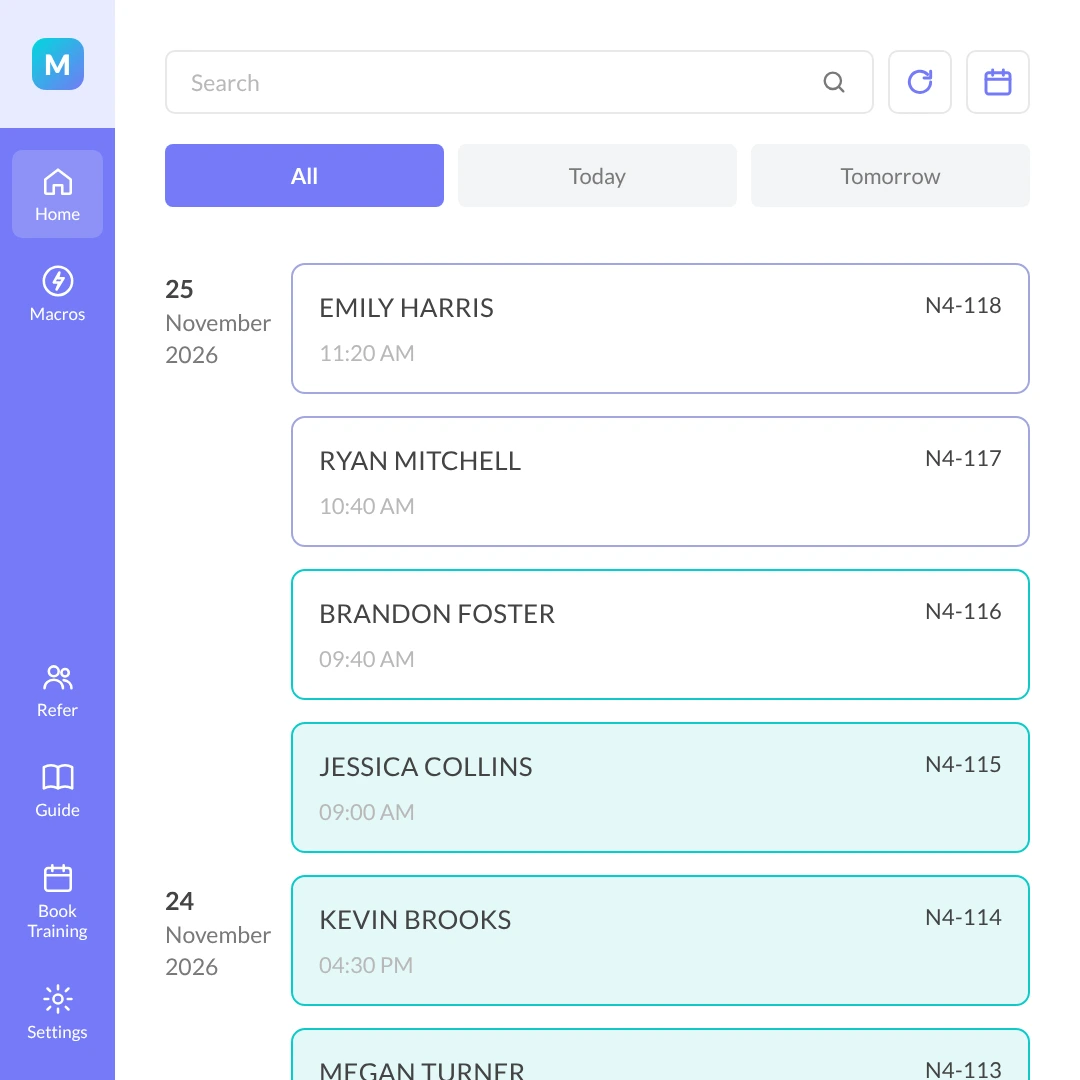
Marvix AI checks NextGen for appointments at fixed times every day depending on the preference of the provider. The appointments booked for the day appear in the Marvix AI queue, ready for the doctor. The team spends no time importing lists or keeping two schedules aligned.
Dr. Cole's clinic opens at 8:30 AM, and his first patient is booked for 8:45. His front desk used to copy each NextGen appointment into a separate documentation tool every morning. Now the first pull of the day runs well before anyone arrives. When he logs in at 8:15, all 20 visits are listed in Marvix AI, in the same order as NextGen. He starts his day from a single schedule that both systems agree on.
Along with each appointment, NextGen sends the patient's date of birth and gender. Marvix AI attaches both to the encounter, which links the note to the right person from the start. The team has no patient details to retype.
A new referral, a 34-year-old woman with recurring headaches, is booked for 11:00 AM. Her date of birth and gender came over from NextGen with the appointment itself. When Dr. Cole opens her encounter, both details are already attached to the note. His medical assistant spends the morning rooming patients, since nothing needs retyping for any of the 20 visits.
A specialty follow-up depends on decisions made at earlier visits. Marvix AI gathers that record from NextGen and condenses it into a pre-visit summary the doctor can read first.
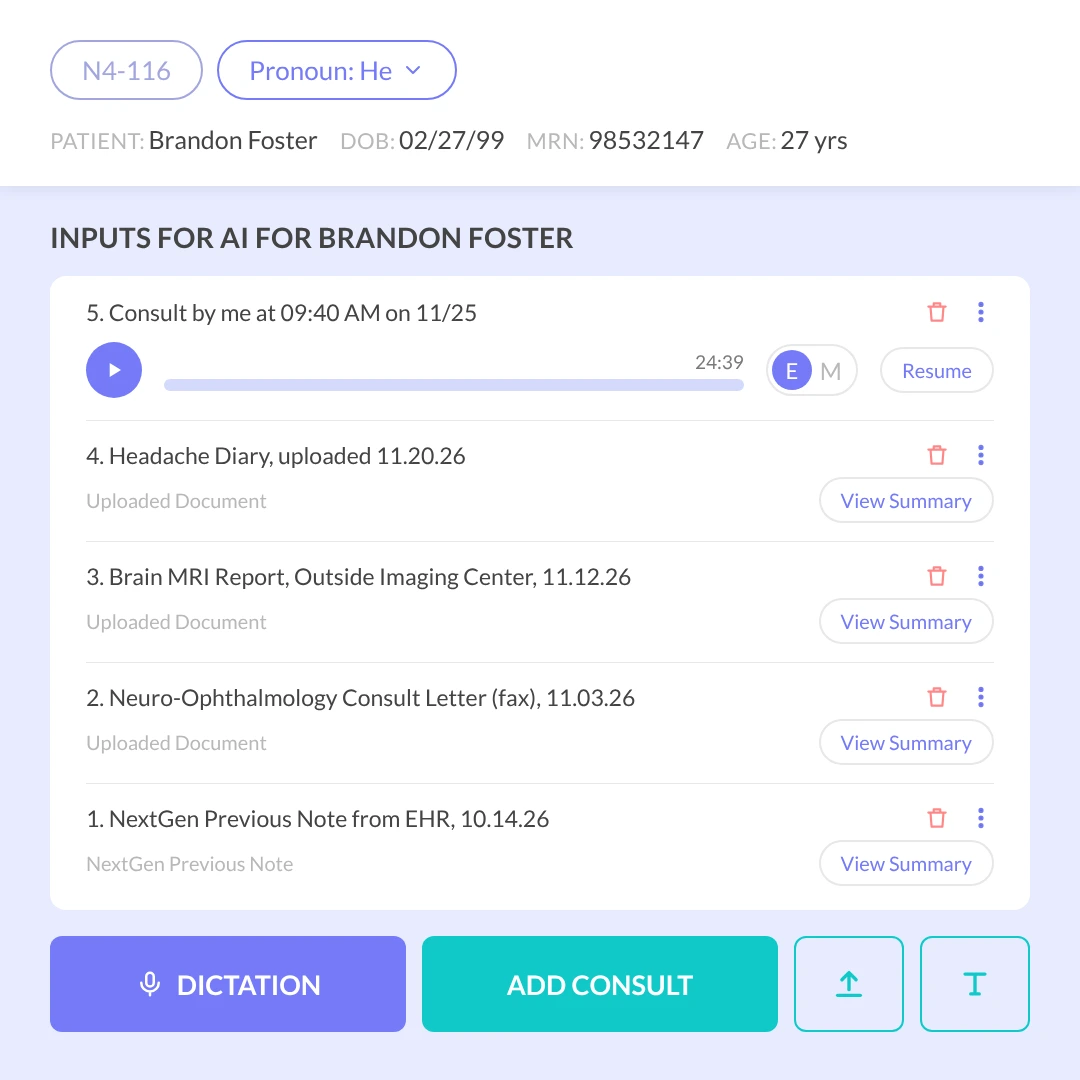
When the appointments come in, Marvix AI also pulls each patient's previous notes from NextGen. They are ready to read as soon as the doctor opens the encounter. Past plans and medication decisions no longer have to be tracked down encounter by encounter.
His 9:40 AM patient is a 52-year-old man with chronic migraine. He has been seen six times in two years, and his preventive medication has changed twice. Finding when and why those changes happened would normally mean opening each old encounter. With every earlier note already in Marvix AI, Dr. Cole finds the most recent change right away. He goes into the visit with his questions about the new medication already planned.
NextGen keeps each note divided into sections, and Marvix AI pulls previous notes in that same form. A past assessment comes in as an assessment, and a past plan comes in as a plan. The doctor can go straight to the part they need, without reading each note from the top.
A 61-year-old woman with peripheral neuropathy returns after a nerve conduction study. He ordered the study at her last visit, along with a change in her pain medication. Before reviewing the results, he needs to see exactly what he planned. Because her earlier note came in by section, he opens only the previous plan. He confirms what was ordered and why, without scrolling through the rest of the note.
Before a follow-up, the doctor needs to know what has happened since the patient was first seen. For a long-term patient, that answer is spread across dozens of separate notes.
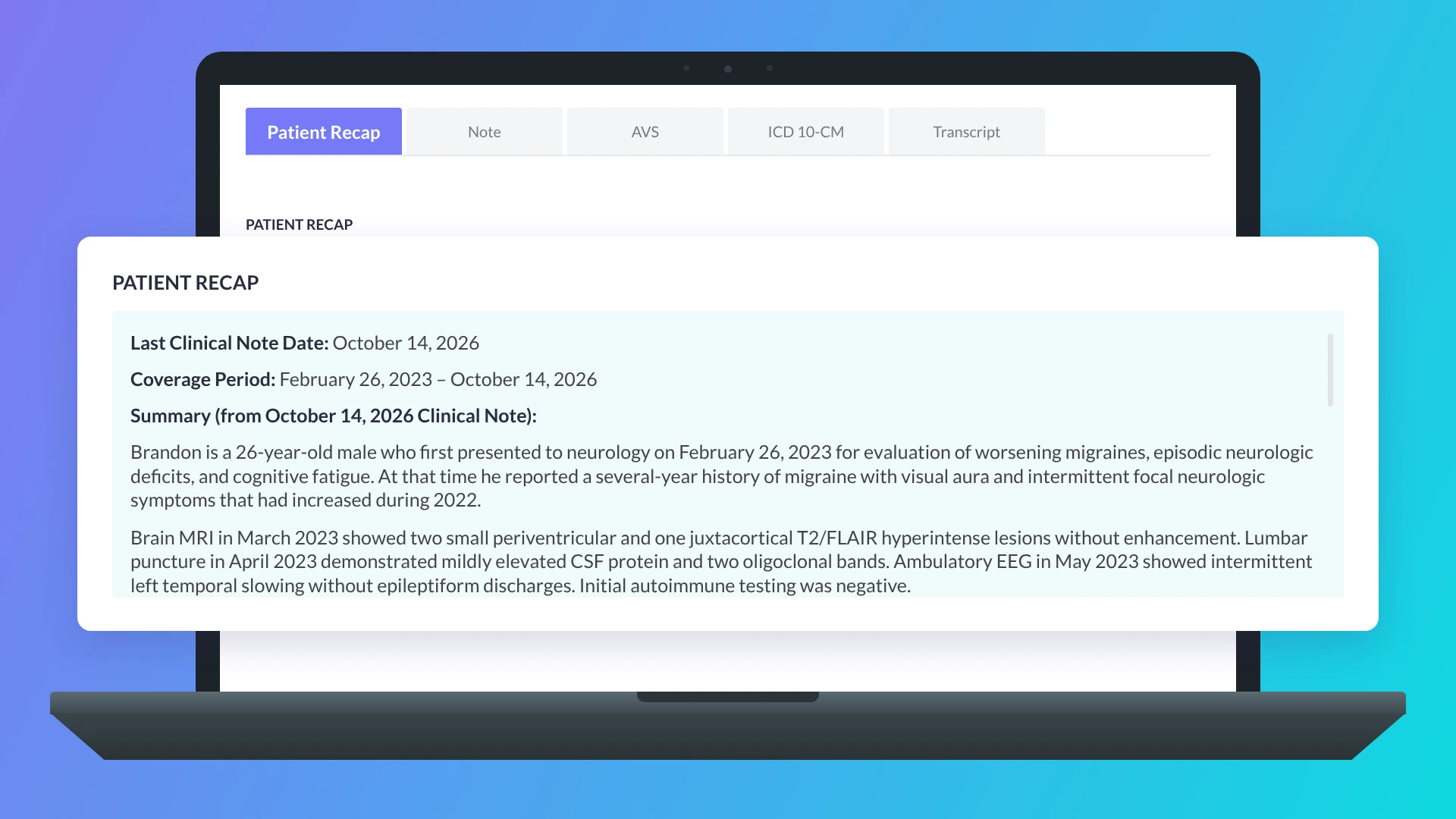
To solve this, Marvix AI produces a Patient Recap summary for every returning patient which is a chronological summary of the patient's history, written before the visit.
Marvix AI writes it using the prior notes pulled directly from NextGen. Documents uploaded by the team, be it in any format, before the visit are included in the summary too. For instance, a fax from another clinic or a handwritten note are processed as well. Team members can also add dictations to add any additional information, which are attributed by name and timestamped.
This longitudinal tracking is essential for specialties where treatment decisions depend on how a condition changes over time. Learn more in our post on the AI Summarizer.
His 10:20 AM patient is a 29-year-old with epilepsy who has had three medication changes in 18 months. Last month, she went to an outside urgent care after a breakthrough seizure. Her team uploaded the urgent care report as a PDF during pre-charting. The Patient Recap places that visit in order with her NextGen history and each seizure frequency update. Between patients, Dr. Cole reads the recap and starts the visit knowing exactly where her treatment stands.
Doctors read summaries in different ways, so Marvix AI lets each provider shape theirs:
The Marvix AI team configures these during onboarding. Every Patient Recap after that follows them automatically.
When Dr. Cole started with Marvix AI, he asked for recaps he could scan in under a minute. He also wanted his standard neurological exam filled in, so he only adds abnormal findings. The Marvix AI team set both preferences during onboarding. Since then, every recap has arrived in that same short format. He reads summaries as they are, with nothing to adjust first.
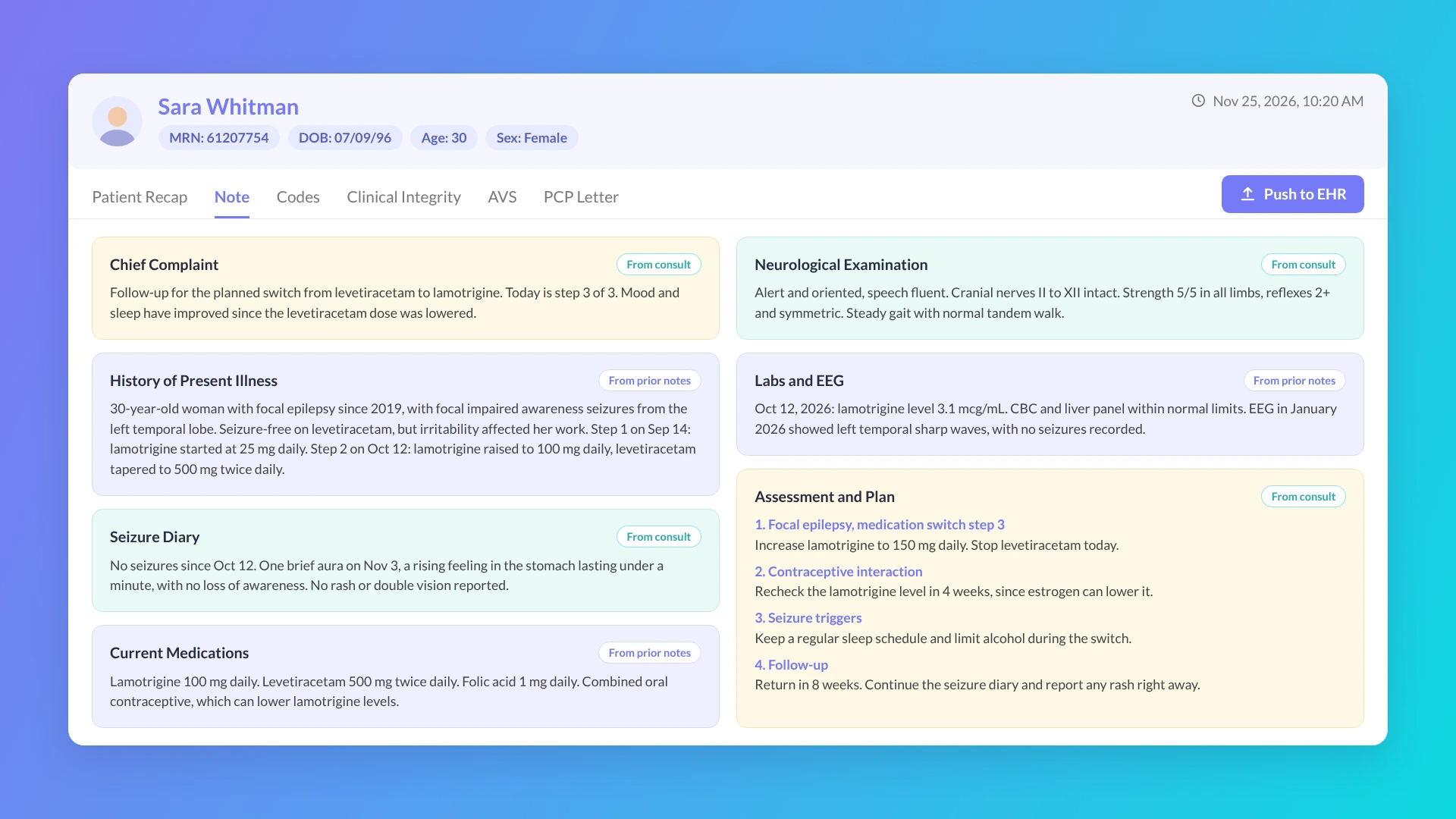
Each follow-up note needs a short record of what happened at earlier visits. Writing that record by hand at every visit takes up a lot of the doctor’s time.
The Composite Note solves this. It merges what was discussed in today's visit with relevant history about the patient. That history is drawn from the Patient Recap. It covers prior notes pulled directly from NextGen, along with any documents the team uploaded.
None of it is copied by hand, and unchanged information isn't documented twice. The history also gives the medical decision-making in today's note a clear basis.
Before signing, the doctor reads the Composite Note and edits anything that needs it.
His epilepsy patient is midway through switching from one seizure medication to another. The switch is planned in three steps, and she has finished the first two. Each step changed her dose and was recorded at a separate visit. The Composite Note brings both earlier steps into today's plan, with their dates and doses. Dr. Cole sets the dose for step three, and the note already shows how she got here.
The visit isn't fully documented until the note is in NextGen. Marvix AI writes the note in each provider's own way and sends it into the chart section by section.
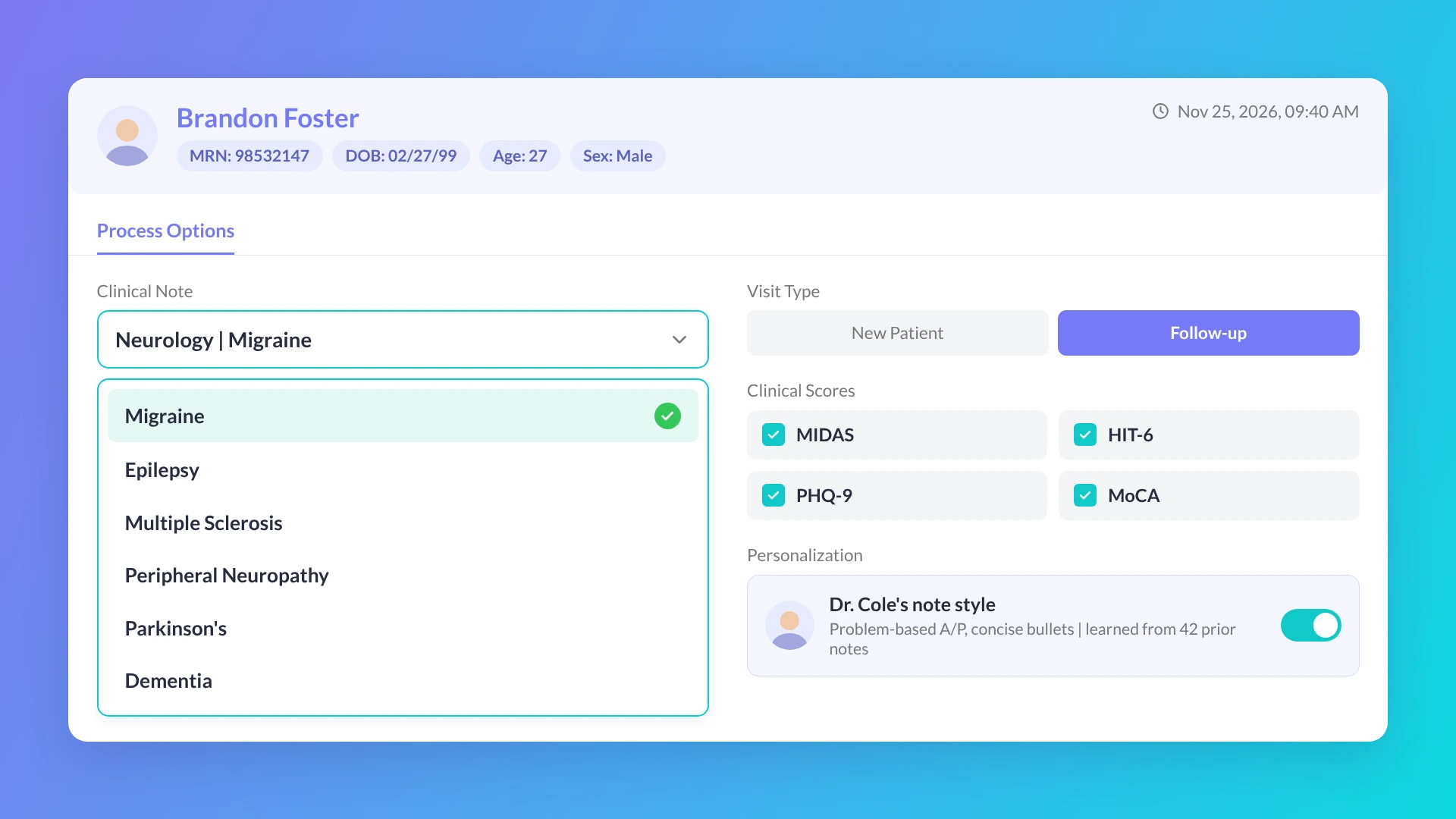
Each provider in the practice gets custom note templates built for them in Marvix AI. They are organized by the provider's subspecialty, the visit type and the condition being treated.
Marvix AI builds these templates by learning from the provider's previous notes. Because of this, every note takes on that provider's formatting, phrasing and structure.
Since the draft already reads the way the doctor writes, there is very little to fix before signing. Read more in our post on custom documentation templates.
Dr. Cole's epilepsy visits focus on seizure control and medication levels. His migraine visits center on headache frequency and preventive treatment. Marvix AI built a separate template for each one, learning from months of his earlier notes. Both templates follow his usual headings and phrasing. Most days, he changes only a line or two before signing.
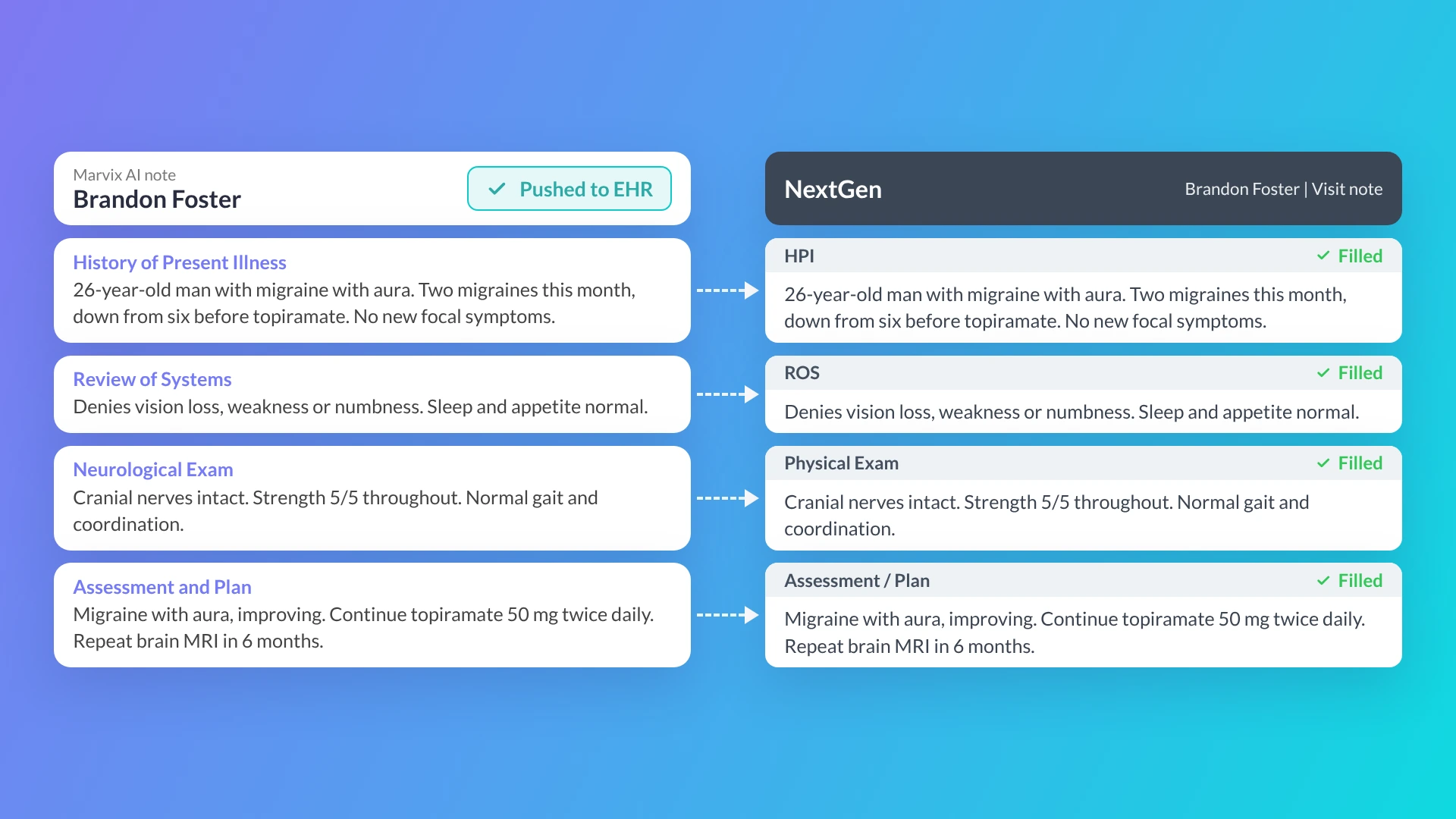
A note that arrives as one long block has to be split into NextGen's sections by hand. Marvix AI removes that step entirely.
During the visit, Marvix AI listens to the conversation and drafts the note in the provider's template. When the visit ends, the doctor reviews the draft and makes any changes.
At setup, the Marvix AI team maps every template section to its counterpart in NextGen. The mapping is configured once and used for every note afterward.
Once the doctor approves, Marvix AI pushes the note into NextGen section by section. The subjective, objective, assessment and plan sections each land where NextGen expects them. Nobody pastes anything, and the visit is documented the moment the push finishes.
His 2:00 PM neuropathy follow-up ends with a plan to adjust medication and repeat bloodwork. When the patient leaves, Marvix AI has already drafted the note in his template. Dr. Cole reads it, changes one line in the plan and approves it. Each section of the note then lands in its matching place in NextGen. By the time he calls in his next patient, the previous visit is fully charted.
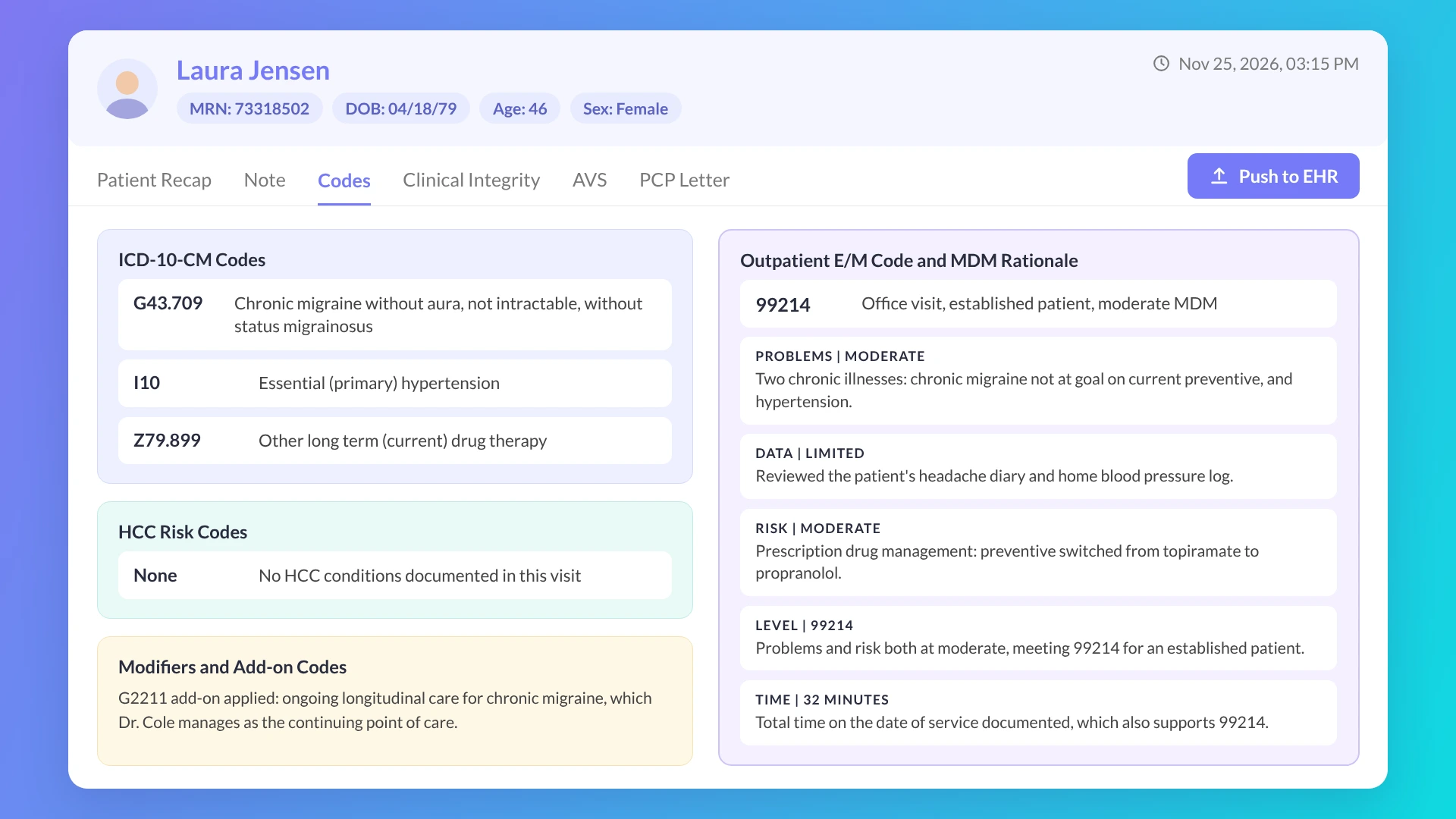
Every visit has to be coded before it can be billed, and the note has to back up every code on the claim. This gets harder in specialty care, where one visit can include several diagnoses.
Marvix AI's Automated Billing Code Generation works from the finished note to produce those codes:
Read more in our post on billing and coding.
His 3:15 PM patient has chronic migraine and high blood pressure. Today, he switches her preventive medication and reviews her blood pressure readings. Marvix AI codes both diagnoses and sets the E/M level based on the decisions he made. The MDM rationale sits beside that level, showing how the visit supports it. Dr. Cole checks the reasoning before signing, and his billing team receives codes that are already backed by the note.
Alongside the NextGen integration, Marvix AI includes several other tools that specialty practices use every day.
On the security side, Marvix AI is HIPAA compliant and has SOC 2 Type II certification. Data is encrypted while it is stored and while it moves between systems. Protected health information from customers is never used to train shared models.
If you want to try Marvix AI out for you and your team, try a 30-day free trial which includes custom workflows and EHR integration setup for the entire team.
A NextGen practice gets the most from an AI scribe that works within the EHR's structure. Marvix AI brings over the day's appointments and each patient's earlier notes, section by section. It summarizes that history and carries the relevant parts into today's note. After the doctor approves, the note goes back into NextGen one section at a time, written in the provider's own style.
Seeing it run on your own NextGen schedule is the most reliable way to judge it. You can book a demo for your team, with complete setup and integration done for you today!


