

Your AI scribe and your EHR have never actually spoken to each other. One generates the note, the other holds the chart, and the space between them has always been filled by you, manually, every single day. This is the problem with Generic AI scribes.
Marvix AI eliminates that. It integrates directly with Veradigm EHR so that your appointments, your patient history, and your clinical notes all move through one connected workflow, with nothing falling through the gap between tools.
Veradigm is a structured, field-based EHR. Documentation does not sit in a single open text area. It lives inside defined template sections, each tied to a specific part of the clinical encounter, from chief complaint through to the assessment and plan.
An AI scribe for Veradigm is one that understands that structure and works within it. That means syncing directly with Veradigm's schedule, retrieving patient history from inside the EHR, generating notes built around the provider's specific Veradigm template, and pushing documentation into the correct fields automatically.
A true AI scribe for Veradigm does not just generate notes. It fits into the system your practice already runs on.
Veradigm has a defined structure, specific template fields, and documentation that must land in the right place. Most AI scribes were not built with any of that in mind.
Notes arrive as free text blocks that need manual placement into Veradigm sections. Appointments do not sync directly, so the physician ends up managing two separate systems. Historical data stays locked inside the EHR, leaving chart review entirely on the physician's plate. And without proper field mapping, pushing a note can land content in the wrong section or require manual correction before it is usable.
Every provider also receives the same generic template, regardless of specialty or how they prefer to document.
Each of these is a friction point on its own. Across a full clinic day, they quietly add up.
Marvix is designed for practices that need specialty-grade documentation without disrupting existing workflows. This includes:
If you are evaluating an AI scribe for Veradigm, these are the capabilities that actually matter in practice.
Here’s a brief overview of what differentiates Marvix as one of the best AI scribes for Veradigm:
In this blog, let’s explore how Marvix AI integrates with Veradigm seamlessly and why many practices consider it the best AI scribe for Veradigm.
To see what this looks like in practice, let's walk through a real clinic day.
Dr. David Fredericks is a medical oncologist who sees approximately 18 patients each clinic day. His schedule includes new cancer consultations, chemotherapy follow-ups, treatment monitoring visits, and survivorship care. Many of his patients have long treatment timelines that include imaging results, pathology reports, chemotherapy cycles, and multiple prior oncology notes stored inside Veradigm. Every visit relies on reviewing recent treatment decisions and disease progression history before documentation begins.
Most AI medical scribes stop at the note. They listen, they transcribe, and they hand you a document. What happens after that is still on you.
Marvix is designed around a different question: did that note land in the right place, at the right time, in exactly the right format inside your EHR? That shift in thinking is what makes the Marvix and Veradigm integration genuinely useful for physicians in practice, every single day.
Let's break it down simply.
Think of it like a teacher who walks into class and already has the attendance sheet filled out, the day's lessons organized, and every student's history in front of them. They didn't scramble to pull it together. It was just there.
That’s exactly what Marvix does with your appointments, whether in the clinic or during a telehealth visit. For remote consultations, Marvix integrates with Zoom, Google Meet, and Google Calendar, letting you capture the visit live or upload the audio recording afterward, and it automatically generates structured notes and documents.
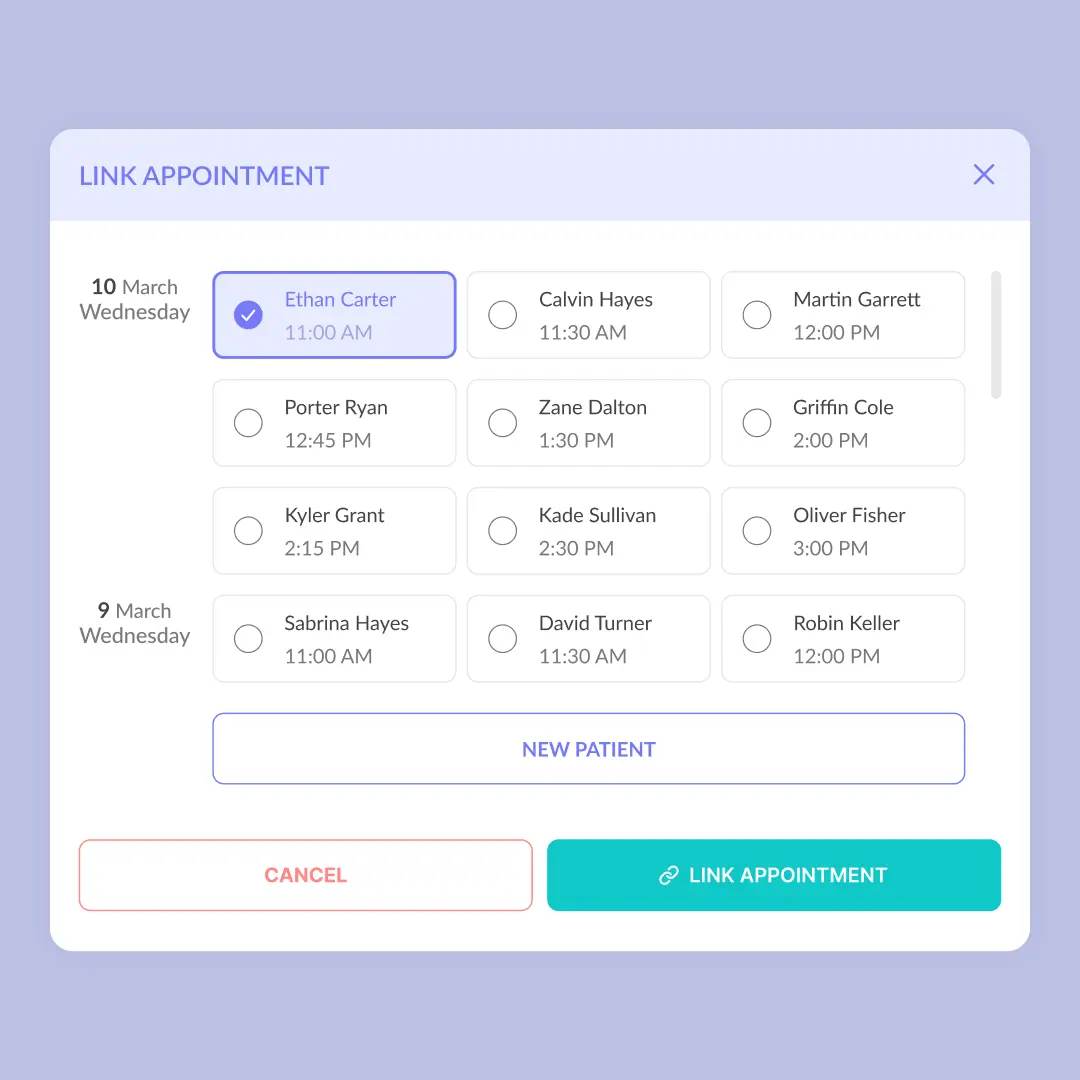
Clinicians often had to manually check their EHR, note who's coming in, and then switch to their scribe tool to get started. It was a small friction, but it happened every single day, dozens of times.
Marvix connects directly to Veradigm and pulls your appointments automatically. Whether the patient is in your clinic or on a telehealth call, Marvix captures the visit ambiently, transforming the conversation into structured notes while you focus on care.
You decide:
The sync runs in the background. When a new appointment is created inside Veradigm, it shows up inside Marvix.
Dr. David Fredericks's Workflow
When Dr. Fredericks logs into Marvix in the morning, his full oncology clinic schedule from Veradigm is already present inside the system. His 18 scheduled patients appear automatically in the order defined by his clinic workflow. New consultations, infusion follow-ups, and treatment monitoring visits are already aligned with his Veradigm calendar. His documentation queue mirrors the source schedule without any manual reconciliation between systems.
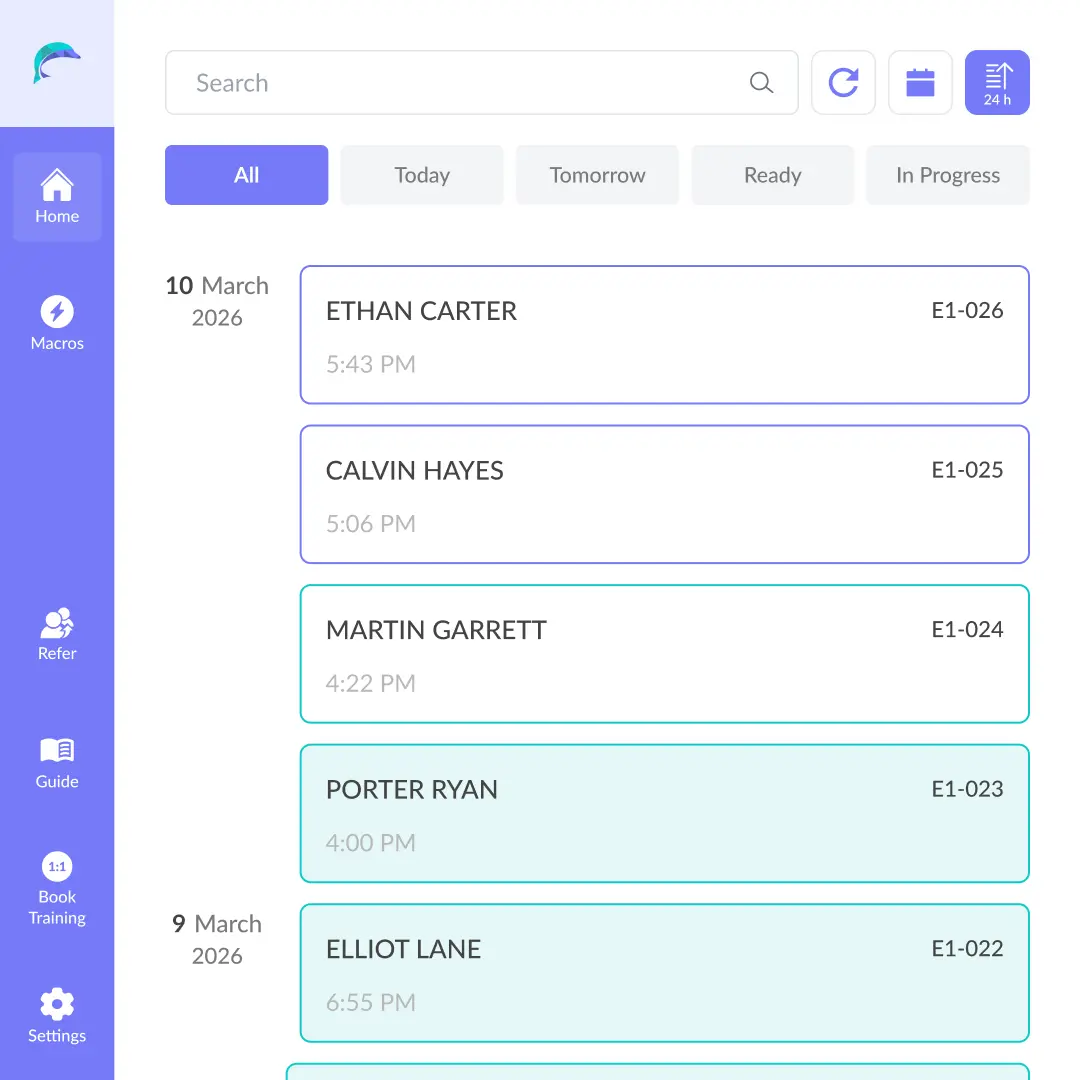
Every practice has its own logic. Some physicians want to see tomorrow's patients first. Others want same-day visits at the top. Some sort by time, others by priority.
You can decide:
For example, if you prefer to review upcoming encounters before same-day visits, that can be done. Your dashboard reflects your workflow, so every morning starts with clarity rather than reorganization.
Dr. David Fredericks's Workflow
His oncology clinic frequently includes same-day infusion follow-ups and rescheduled consults. When appointments change inside Veradigm, Marvix reflects those updates during the next configured sync interval. When Dr. Fredericks reviews the upcoming patient list before clinic begins, the visit queue matches the current Veradigm schedule without requiring additional oversight.
Documentation starts the moment you know who's walking through the door. Automatic appointment sync means you're already oriented before the visit begins, so you can focus entirely on the patient in front of you.
Clinical documentation depends on relevant context. Marvix integrates with Veradigm to retrieve prior notes based on how providers review returning patients.
Instead of defining a date range, you can define the number of previous encounters you want to retrieve. You can choose to:
For example, if it is a fifth visit and you want to review prior encounters, Marvix retrieves it automatically in the background and brings it into your workflow alongside the current encounter.
This allows you to control how much history informs your current documentation.
Dr. David Fredericks's Workflow
His 10:40 AM patient is returning for chemotherapy response evaluation after several treatment cycles. Marvix retrieves the configured number of prior oncology visits from Veradigm before the encounter begins. Previous treatment plans, adverse event notes, and imaging follow-ups appear together inside the encounter workspace. This allows Dr. Fredericks to review recent clinical progression immediately before seeing the patient.
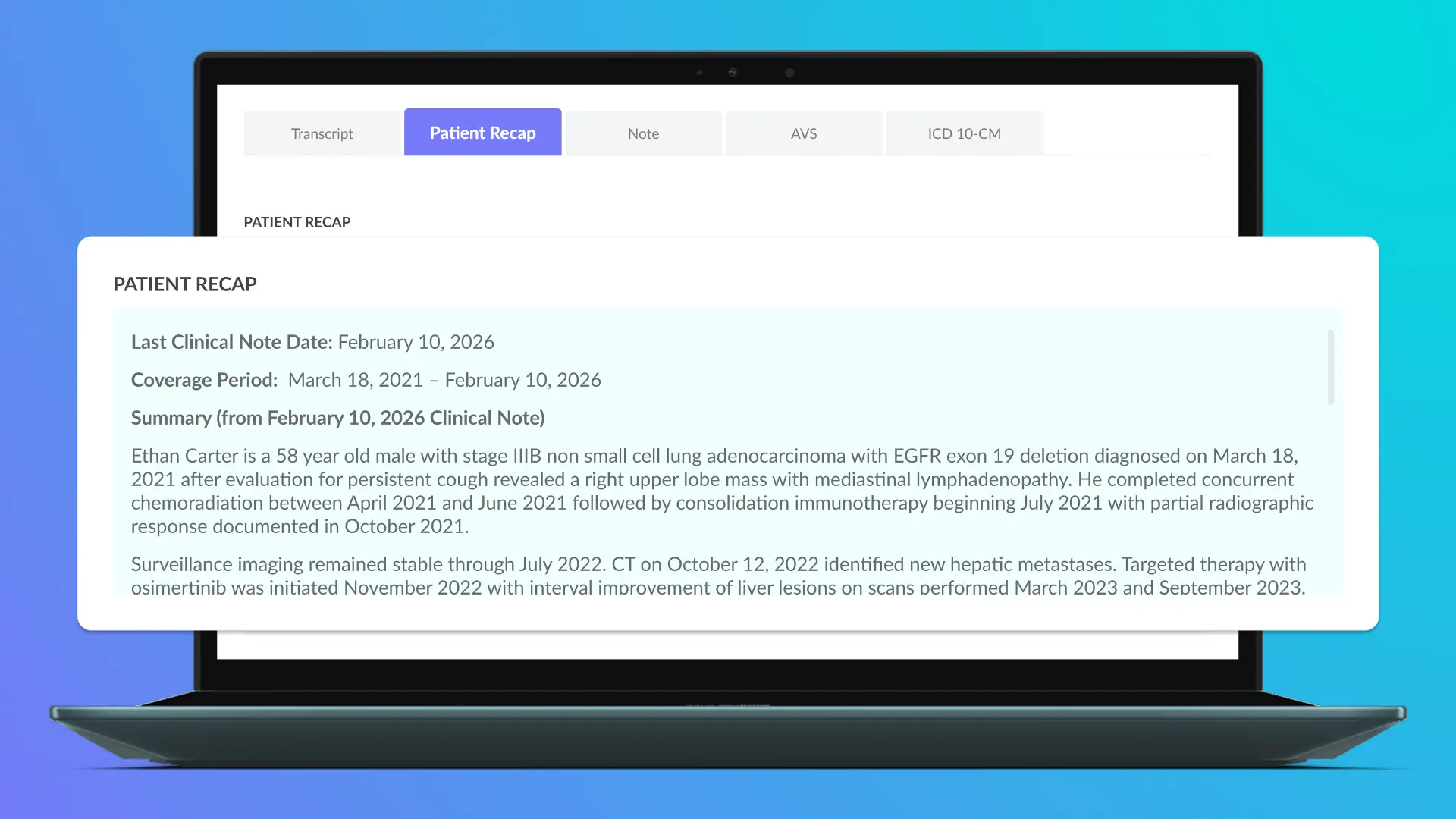
Reading through years of patient notes before every visit is time-consuming. Marvix solves this with AI-generated summaries that consolidate a returning patient's prior notes into a single, structured clinical overview that can:
Summaries are generated automatically ahead of the scheduled visit, so the clinical overview is ready before the patient even arrives. What used to take several minutes of manual chart review now takes a single click.
Marvix AI is the only AI scribe that creates AI summaries directly from previously stored EHR notes in this manner.
Dr. David Fredericks's Workflow
For patients undergoing long-term chemotherapy management, Marvix generates a structured summary from the retrieved Veradigm notes. Key elements such as tumor response trends, medication adjustments, and imaging references appear in a single clinical overview. When Dr. Fredericks enters the exam room, the relevant treatment history is already consolidated and ready for review and to inform the current note.
Every provider works differently, and Marvix is built to reflect that. Summaries are fully customizable at the individual provider level. Each provider can configure:
These preferences are set up by the team, so the physician doesn’t even need to do it manually. Once set up, these preferences apply automatically every time a summary is generated.
Dr. David Fredericks's Workflow
Dr. Fredericks prefers structured summaries that emphasize treatment timeline, prior chemotherapy regimens, and recent imaging findings. These preferences are configured at the provider level. Each summary generated from Veradigm notes follows the same structure across all oncology encounters. His documentation style remains consistent across every patient visit without requiring manual restructuring.
Clinical decision-making improves when context is controlled. You define what's relevant, and Marvix retrieves it precisely and summarizes it so you walk into each visit already prepared.
Generating a clean, accurate clinical note is only half the job. The other half is making sure it lands in the correct place inside your EHR, in the right field, under the right section, formatted the way your template expects.
Dr. David Fredericks's Workflow
His Veradigm oncology template includes discrete fields for HPI, oncology treatment history, physical exam, assessment, and treatment plan. When Marvix generates documentation from the encounter, each section maps directly into the corresponding Veradigm field. The note arrives already structured according to his oncology documentation layout.
When Marvix pushes a note into Veradigm, each section of the note maps directly to the corresponding field in your Veradigm template. The chief complaint goes where chief complaint belongs. The assessment goes where Assessment belongs. Your existing documentation structure stays intact, and Marvix works within it.
This means your charts look consistent across every encounter, which supports continuity of care, billing accuracy, and audit readiness without any additional effort on your part.
Dr. David Fredericks's Workflow
His Veradigm oncology template includes discrete fields for HPI, oncology treatment history, physical exam, assessment, and treatment plan. When Marvix generates documentation from the encounter, each section maps directly into the corresponding Veradigm field. The note arrives already structured according to his oncology documentation layout.
Documentation preferences vary by provider. Marvix supports flexible mapping configurations.
This includes:
Your documentation structure remains intact while Marvix aligns with it.
Dr. David Fredericks's Workflow
For chemotherapy follow-up visits, he prefers treatment decisions and medication adjustments to appear together within the Assessment section. Marvix supports this configuration through flexible field mapping without changing the Veradigm template itself. His documentation hierarchy stays aligned with the way he evaluates oncology treatment plans.
Once a note is finalized, whether from in-office or telehealth encounters, Marvix delivers it directly into the patient chart inside Veradigm with the push of a button. The note is complete, and it's in the chart. Documentation stays synchronized with your clinical activity throughout the day.
Dr. David Fredericks's Workflow
During a full oncology clinic session, Dr. Fredericks occasionally adds quick notes directly inside Veradigm between patient encounters. When Marvix pushes the finalized documentation, the note integrates cleanly with the existing chart entries. The clinical record remains complete while the final structured note appears inside the Veradigm chart.
Marvix supports a broad spectrum of clinical notes across specialties which are custom made in the physician’s preferred style. These include:
Every additional step between finishing a note and having it in the chart is a point where documentation can fall behind. It keeps your records current in real time, so end-of-day catch-up becomes a thing of the past.
Marvix does more than document such as:
To see how this extends across specialties, learn more about how Marvix supports specialty-specific workflows.
Also, Marvix AI adheres to industry-standard security and privacy controls, is SOC 2 Type II and HIPAA compliant, uses encrypted storage and transit, offers configurable data retention, and does not use customer PHI to train shared models.
If you're evaluating the best AI scribe for Veradigm, understanding how the AI Scribe interacts with Veradigm templates and workflows is critical.
The best documentation workflows are the ones physicians stop thinking about. Everything is ready, everything is connected, and the note reaches the chart before the next patient walks in. Marvix and Veradigm together make that the standard for every encounter in your practice.
If you're looking for an AI scribe built for specialty workflows on Veradigm, book Marvix's customized demo to see how it works in your practice, since day 1 (even during your trial.)
.png)


